Descript is an AI-powered audio and video editor built around a simple idea: you edit media by editing the transcript. Instead of scrubbing through waveforms and timelines, you read the words, delete the ones you do not want, and the audio and video follow. After testing it across podcast editing and video content workflows, this core concept genuinely changes how you approach editing spoken content. For podcasters and video creators who work primarily with talking-head material, it removes most of the friction that makes traditional timeline-based editing slow.
The feature set extends well beyond transcript editing. Overdub lets you clone your own voice with AI and fix audio mistakes without re-recording, a capability podcasters consistently cite as a primary reason they stay with Descript. Filler word removal ("um," "uh," "like") works with one click and is the single most praised feature across user reviews. Studio Sound handles noise removal and audio enhancement. Underlord, the AI assistant, automates tasks like creating highlight clips, writing show notes, and generating chapter markers. Descript Rooms, built on the SquadCast acquisition, handles remote guest recording. And an API now in early access opens automation through Zapier and Claude/MCP integration.
Pricing restructured to a credit-based model in 2025 and the community reaction has been consistently negative. The free plan is too limited to finish a real project. Hobbyist starts at $16/month billed annually ($24 monthly), Creator at $24/month annually ($35 monthly), Business at $50/user/month annually ($65 monthly). Descript has no lifetime-deal option: every plan is a recurring subscription, billed monthly or annually. Credits get consumed by both successful and failed AI tasks, meaning Underlord can drain your budget on work it does not complete. One user reported a quote of over $1,200/month for heavy text-to-speech usage. For standard podcast editing the pricing is workable, but anyone relying heavily on AI features needs to track credit burn carefully.
Descript pioneered transcript-based editing and that core innovation remains genuinely useful. The tool is best-in-class for the podcast and online course workflow it was designed for. Underlord is unreliable enough that users describe it bluntly in community threads, and the credit pricing has created real churn among long-term subscribers. Competitors including CapCut, Adobe Premiere with AI features, and Riverside.fm are absorbing some of that outflow. If you are evaluating AI video editing tools, compare Descript with Vozo AI for a different approach to AI-assisted editing, or explore ElevenLabs if voice generation quality is your primary concern.
What Makes Descript Different
Most video editors treat the timeline as the primary interface. You scrub through footage, find the section you want to cut, and mark in and out points. Descript inverts this: the transcript is the primary interface, and the timeline is secondary. You read the transcript like a document, select the words or sentences you want to remove, hit delete, and both the audio and video are cut. For anyone who edits spoken content, this is a fundamentally faster workflow.
The practical impact is significant for podcasters and course creators. A 60-minute recording might generate 9,000 words of transcript. Finding a rambling section by skimming text takes seconds. Finding the same section by scrubbing a waveform takes minutes. Multiply that across every edit in a 60-minute episode and the time savings compound. This is why Descript retains loyal users even as they complain loudly about pricing: the editing paradigm is genuinely better for spoken content than anything else on the market.
Beyond the transcript core, several features distinguish Descript from other AI video editors:
- Overdub (AI Voice Cloning): You train a voice model on 10 minutes of your own audio. After that, you can type corrections directly into the transcript and Overdub generates audio in your voice. No re-recording, no audio mismatches, no retakes. For podcasters who record alone and catch mistakes in post, this is genuinely useful. No close competitor offers this natively at the same quality level.
- Studio Sound: One-click noise removal and audio enhancement powered by AI. Upload a recording from a noisy home office and Studio Sound strips the background, normalizes levels, and improves clarity. The known limitation is that it adds subtle reverb artifacts when applied to very short sections, which some users find worse than the original problem.
- Eye Contact Correction: Available on Creator and above, this feature uses AI to adjust your gaze in recorded video so you appear to be looking at the camera even when reading notes or looking at a second screen. It is imperfect at extreme angles but works well for standard webcam recordings.
- Underlord AI Agent: Underlord is meant to automate the tedious parts of editing: removing filler words, shortening silences, generating highlight clips for social media, writing show notes, and building chapter markers. In practice it is less reliable than the marketing suggests. The community reaction is split: some users get consistent value from filler removal and silence shortening; others report Underlord failing tasks without warning and consuming credits for incomplete work.
- AI Speakers (Text-to-Speech): Descript offers a library of AI-generated voices for narration, voiceovers, and commentary. Useful for adding narration to screen recordings without recording audio yourself. The credit cost becomes a serious concern at production scale.
- Descript Rooms: Remote recording for podcast guests, built on the SquadCast infrastructure Descript acquired. Records each participant on separate tracks, at high quality, in-browser. The integration means you can go from remote recording to finished edit without leaving Descript.
- API Access: An API opened in early access in 2026 allows importing files, triggering Underlord workflows, and integrating with Zapier or Claude/MCP for automated production pipelines. The developer community has responded positively, though the API is early and feature coverage is limited.
The result is a tool that covers the full podcast and online course production workflow: remote recording, transcription, editing, filler removal, noise cleanup, captions, social clips, and publishing, without switching between applications. For the right use case, replacing five separate tools with one is a meaningful operational simplification.
Descript Pricing Plans 2026
Descript switched to a credit-based pricing model in 2025. Each AI action, including transcription, Overdub, Underlord tasks, and AI Speakers, consumes credits from your monthly allocation. The shift away from simple minute-based plans created significant frustration because credits are less predictable than minutes, and because failed Underlord tasks still consume credits even when they produce no usable output.
Free Plan
The free tier gives you access to Descript with very limited AI credits. It is realistic as a trial window to test the transcript editing interface, but there is not enough credit allocation to complete a full podcast episode or course module from recording to publish. If you want to genuinely evaluate Descript, you will need at least a Hobbyist subscription.
Hobbyist: $12/month
The entry paid tier. Includes transcript editing, basic Underlord access, captions, and screen recording. AI credit allocation is limited. Suitable for occasional content creators publishing one or two pieces per month who do not rely heavily on AI automation. Overdub voice cloning is not included at this tier.
Creator: $24/month
The tier where Descript becomes a serious production tool. Creator adds Overdub voice cloning, expanded Underlord credit allocation, AI clip generation, Eye Contact correction, and Green Screen background removal. This is the recommended tier for podcasters publishing weekly and YouTube creators with regular upload schedules. The $24/month price is comparable to a single Riverside.fm subscription, a single Otter.ai subscription, and a Canva Pro subscription combined, which gives context to the "all-in-one" value proposition.
Business: $40/user/month
Business adds a larger AI credit pool, team collaboration features, priority support, and API access. At $40/user/month it is meaningfully more expensive than Creator for solo operators. The tier makes sense for production agencies or marketing teams where multiple editors need access and the credit volume justifies the per-seat cost. If you are a solo podcaster or solo YouTuber, Creator is almost certainly enough.
Enterprise: Custom pricing
Enterprise provides volume credit allocations, SLA guarantees, dedicated onboarding, and compliance documentation. Aimed at media companies and large marketing operations with high-volume production requirements. Get a quote from Descript's sales team for specifics.
What to Watch for with Credits
The credit model has practical implications worth understanding before you subscribe. Underlord tasks that fail mid-process still consume credits. AI Speakers (text-to-speech) burns credits at a rate that becomes expensive for high-volume narration work: users with production-scale TTS workflows report quotes exceeding $1,200/month when using Descript for this purpose. If text-to-speech is central to your use case, evaluate Murf AI or ElevenLabs as dedicated alternatives with predictable pricing. For editing podcasts and videos where TTS is occasional, the Creator tier credit allocation is workable.
Descript vs Traditional Video Editors
The honest comparison between Descript and traditional NLEs (non-linear editors) is not "Descript is better." It is "Descript is better for specific workflows and worse for others."
Descript vs Adobe Premiere Pro
Premiere Pro is a professional production environment for highly produced video: multicam with complex color grading, visual effects, advanced audio mixing, and broadcast output. If your workflow involves multiple camera angles, motion graphics, significant color work, or cinematic production values, Premiere is the right tool and Descript is not a replacement. Where Descript wins is the editing speed for spoken content. A podcast episode that takes 90 minutes to rough cut in Premiere might take 30 minutes in Descript if the edit is primarily dialogue-based. Premiere has added AI features (auto-transcription, remix, enhance speech) but they are additions to a complex interface, not the primary interface.
Descript vs Final Cut Pro
Final Cut is Mac-only, one-time purchase ($299), and faster for timeline-heavy workflows on Apple hardware. Similar comparison to Premiere: better for visually complex production, slower for transcript-based dialogue editing. The one-time pricing is an advantage over Descript's subscription for low-volume creators.
Descript vs CapCut
CapCut is the strongest competitive threat to Descript in the short-form content space. CapCut is free for most features, mobile-native, has a large template library, and produces social-ready content quickly. For YouTube Shorts, TikTok, and Instagram Reels, CapCut is faster and cheaper. Descript is stronger for long-form content (full podcast episodes, 30+ minute YouTube videos, online courses) where transcript editing provides real advantage. If your primary output is short-form social content, CapCut is the more practical choice. For long-form spoken content, Descript wins.
Descript vs Vozo AI
For AI-first video editing within the Belreos catalog, Vozo AI takes a different approach, focusing on AI-generated video and short-form content rather than transcript-driven editing of recorded footage. They serve different primary use cases: Descript for editing real recordings, Vozo for generating and assembling AI-native video content.
The bottom line: if your content is primarily dialogue-based (podcast episodes, online courses, talking-head YouTube videos, webinar recordings), Descript outperforms traditional NLEs on editing speed by a significant margin. If your content is visually complex or short-form social-first, the traditional tools or CapCut are likely better fits.
Is Descript Worth It in 2026?
It depends on which tier you are evaluating and how you use AI features.
For podcasters publishing weekly, the Creator tier at $24/month delivers real value. Transcript editing is faster than waveform editing for dialogue. Filler word removal works consistently and is the feature users cite most often as genuinely useful. Overdub handles the "I need to re-record this sentence but I am already at the edit stage" problem that every podcaster eventually hits. If you publish one episode per week, the time savings over a year likely exceed the subscription cost by a meaningful margin.
For online course creators, the value calculation is similar. Transcript editing, captions, and Overdub for correcting narration errors are genuinely useful. Eye Contact correction helps if you are reading from notes while recording. Studio Sound cleans up audio from home office environments.
Where the value calculation gets complicated is with Underlord. If you are subscribing primarily for AI automation, specifically for automated social clip generation and AI-written show notes, the reality is more frustrating than the marketing. Underlord's clip generation still requires significant manual curation, and failed Underlord tasks consume credits. Several users report feeling the AI layer is "mostly useless" in its current state, with the transcript editing and Overdub carrying the actual value.
The 2025 pricing restructure also shifted the value calculation for legacy users. Former plan holders who migrated reported paying roughly 26% more for equivalent access. That sting is real, and it explains the churn discussion in the community. For new subscribers evaluating Descript fresh, the Creator tier at $24/month is priced reasonably against the combination of tools it replaces. For users who joined at lower legacy rates, the comparison is less favorable.
If Descript is on your shortlist, start with the free tier to confirm the transcript editing interface works for your content type, then trial Creator for one billing cycle before committing. The interface is either a revelation or a frustration depending on your workflow, and it is worth verifying before committing annually.
Frequently Asked Questions
Is Descript worth the Creator tier price?
For podcasters and course creators publishing at least twice a month, yes. The $24/month Creator tier includes transcript editing, Overdub voice cloning, filler word removal, captions, and expanded Underlord credits. The combined time savings on a regular publishing schedule typically exceed the subscription cost. For occasional creators publishing once a month or less, the Hobbyist tier at $12/month or a free trial cycle is a better starting point.
How does Descript pricing compare to CapCut?
CapCut is free for most features, which makes it difficult to compare directly. CapCut wins on price for short-form social content where its template library and mobile workflow are strongest. Descript wins on editing speed for long-form spoken content where transcript editing provides advantage CapCut does not offer. If you are primarily making YouTube Shorts or TikToks, CapCut is the more cost-effective choice. If you are primarily editing full podcast episodes or online course modules, Descript's paid tiers are justified by the time savings.
Does Descript work for long-form videos?
Yes, transcript editing actually scales better with longer content than traditional timeline editing does. A 90-minute interview is faster to rough cut in Descript than in Premiere because you can read through the transcript and make selections in text rather than scrubbing 90 minutes of waveform. The known limitation for long-form content is that Underlord's automated clip generation for social media still requires substantial manual curation: the AI suggestions are a starting point, not a finished output. Plan for manual review of any AI-generated clips.
What AI voices does Descript offer in 2026?
Descript offers AI Speakers, a text-to-speech library of AI-generated voices for narration and voiceover work. The more distinctive feature is Overdub: you can create an AI model of your own voice by training on roughly 10 minutes of your existing recordings. Overdub lets you type transcript corrections that are then synthesized in your voice, useful for fixing errors in recorded audio without re-recording. For broader AI voice generation needs, dedicated tools like ElevenLabs offer more voice variety and higher output quality, though Overdub's personal voice cloning remains a unique offering for the editing use case.
Can I export broadcast-quality video from Descript?
Descript exports standard video formats at resolutions up to 4K on paid tiers. For podcast video content (talking head, screen recordings, multi-track remote interviews), the export quality is suitable for YouTube and social platforms. Where Descript is not a replacement for Premiere or Final Cut is in the post-production layer: color grading, visual effects, complex audio mixing, and broadcast master file delivery. If your output requires those capabilities, Descript fits earlier in the workflow (recording, transcript editing, rough cut) and you hand off to a traditional NLE for finishing.
Does Descript replace traditional video editors?
For podcast and online course workflows, it replaces most of what creators actually do in traditional NLEs: rough cutting, filler removal, silence shortening, caption generation, and basic audio cleanup. For cinematic video production requiring color grading, visual effects, advanced audio design, or broadcast output specifications, it does not. Many professional video creators use Descript for the transcript-based rough cut stage and finish in Premiere or Final Cut for color and audio polish. The two tools serve different parts of the production workflow rather than being direct replacements.

- Transcript-based editing is genuinely transformative for anyone who thinks in words rather than waveforms
- Overdub voice cloning for fixing audio without re-recording is a capability few competitors offer natively
- All-in-one for audio and video replaces multiple software subscriptions for recording, editing, and publishing
- Filler word removal is the most consistently praised feature and works reliably out of the box
- Silence shortening automatically removes dead air and is a genuine time saver for podcast editing
- Eye Contact correction and Green Screen add polish to remote and home-office recordings
- New API access through Zapier and Claude/MCP opens real automation possibilities for production workflows
- Credit-based pricing creates unpredictability - users burn through credits faster than expected and failed AI tasks still consume them
- Underlord is unreliable and described by users as "mostly useless" - it fails tasks without confirming and wastes credits in the process
- Studio Sound adds reverb artifacts to short audio sections that cannot be removed after processing
- Performance and stability problems including Rooms freezing, transcription not completing, and app display bugs
- Transcription accuracy has not improved meaningfully - users report correcting the same names after years of use
- Long-form to short-clip workflow is disappointing and still requires significant manual curation despite AI promises
- Text-to-speech pricing becomes unaffordable at production scale with users reporting quotes over $1,200/month
Podcasters and video content creators who publish regularly and want to edit by editing transcripts rather than waveforms, with AI voice cloning and filler word removal
Credit-based pricing creates unpredictability - users burn through credits faster than expected and failed AI tasks still consume them. Underlord is unreliable and described by users as "mostly useless" - it fails tasks without confirming and wastes credits in the process.
Pricing
As of Sep 2026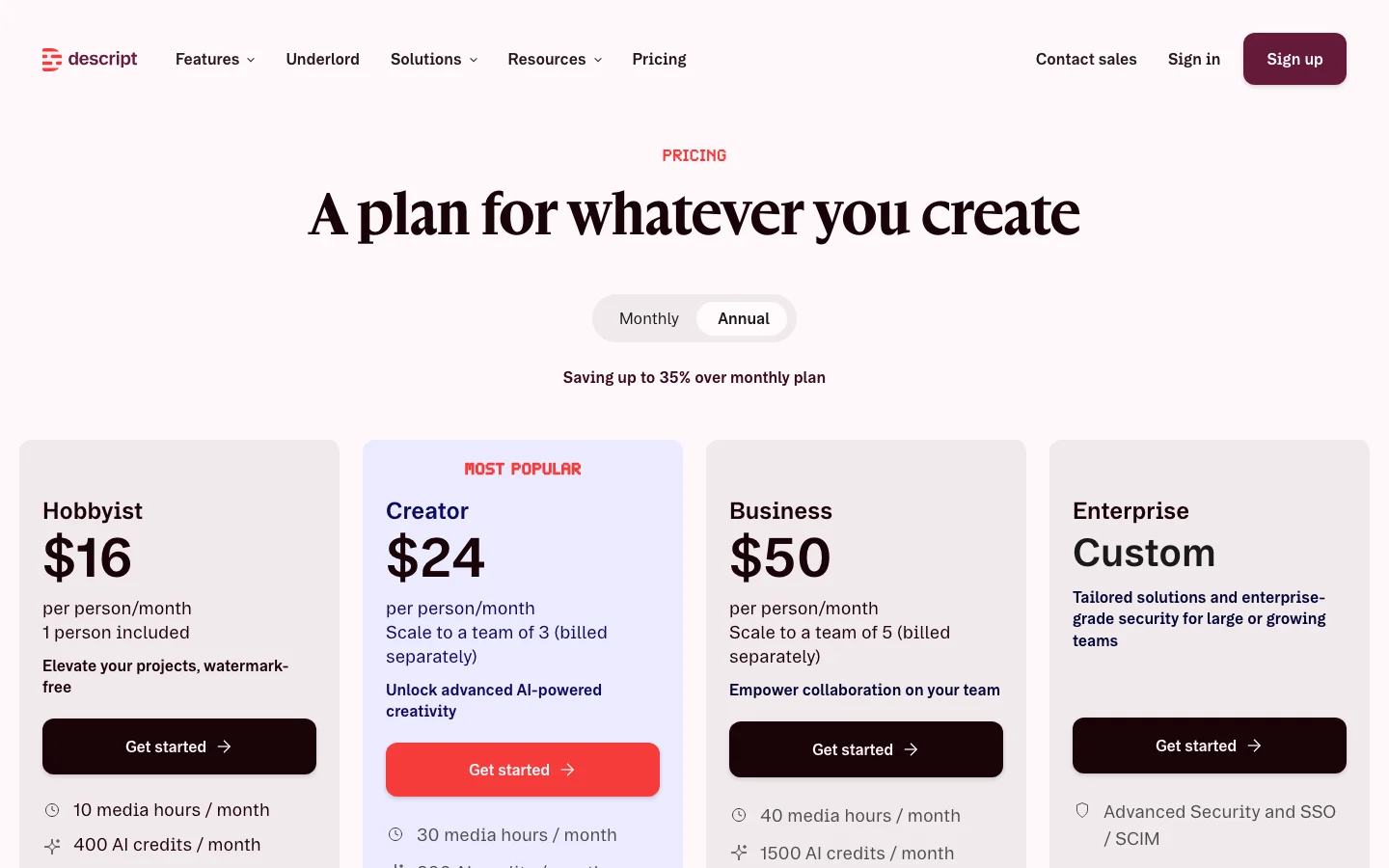
This review was produced independently by the Belreos editorial team. See how we score and test AI tools. Looking for more options? Browse all AI Video Editing Tools tools on Belreos.