Update (June 2026): SpaceX exercised its option to acquire Anysphere, the parent company of Cursor, in an all-stock transaction announced June 16, 2026, valuing the deal at approximately $60 billion. The deal is signed and pending regulatory approval, with closing expected around Q3 2026. No product changes, pricing changes, or rebranding have been announced. Sources: @SpaceX, @cursor_ai.
Cursor is an AI-native code editor built as a fork of VS Code, and it has become the dominant AI-first IDE in developer communities as of 2026. Testing reveals that its core strength is treating AI as a first-class collaborator rather than a bolt-on plugin. It supports multi-model access - Claude, GPT-4.1, Gemini, Kimi K2, and its own Composer 2 model - and handles agentic code generation across multiple files through its Agent mode. For developers who want AI deeply woven into their editing workflow rather than sitting in a sidebar, Cursor is the tool that has set the standard.
The feature that gets the most attention is Agent mode (formerly Composer), which handles complex multi-file refactors in a single prompt. Users on Reddit report GPT-5 on Cursor resolving 7 Jira tickets in 3 hours, and posts like that are not unusual in the r/cursor community. The tab autocomplete is context-aware and meaningfully smarter than line-by-line suggestions from competing tools. Codebase indexing means Cursor understands your entire repository, not just the file you have open. And .cursorrules files let you set project-level instructions so you are not re-explaining your codebase conventions every session.
Pricing starts at free for a limited Hobby plan, $20/month for Pro with extended Agent limits, and $40/user/month for Teams with shared rules, SSO, and org-wide privacy controls. The rate limit structure is a consistent friction point - heavy users burn through their fast request quota on third-party models mid-project and get throttled to slow requests, which can disrupt momentum on complex refactors. There was also community frustration when Composer (now Agent mode) was discovered to be running Kimi K2.5 without upfront disclosure, which raised transparency concerns that have since been addressed.
The competitive picture is clear: developers who try Cursor tend to stay. The r/cursor subreddit is growing fast, posts about switching from GitHub Copilot to Cursor are common, and the tool has built a genuine evangelical user base. Quality regressions from rapid shipping (Cursor 3 drew complaints from veteran users adjusting to the new Agents Window) and context window limits on very large codebases are real but have not slowed adoption.
What Makes Cursor Different
Most AI coding tools add AI on top of an existing editor. Cursor built the editor around AI from the start, and that architectural choice shows up in every feature.
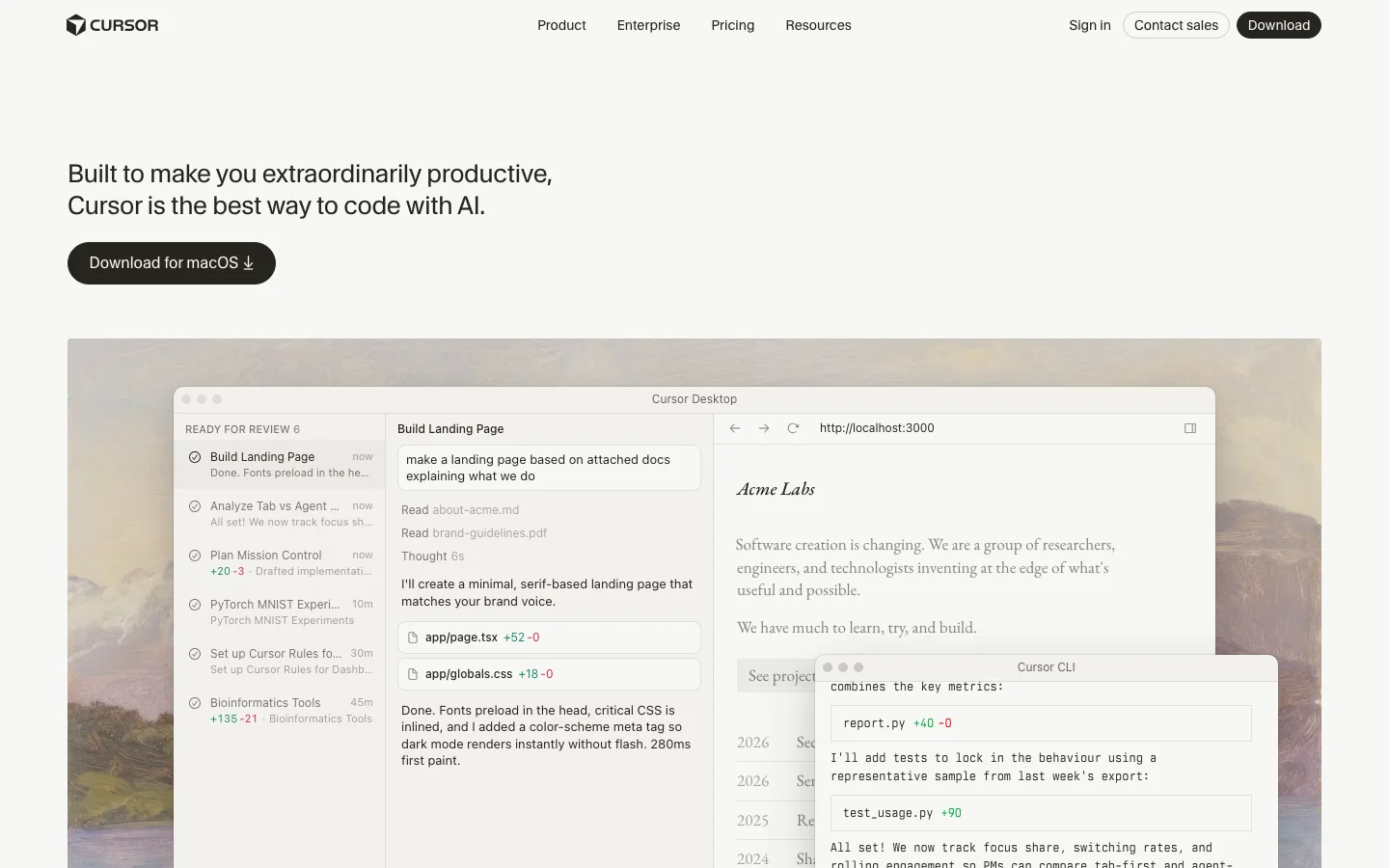
The Agents Window in Cursor 3 (launched April 2026) is the clearest expression of this philosophy. Instead of one chat sidebar, you get a full multi-agent workspace where you can run several agents in parallel across different repos, move agent sessions between your local machine and the cloud mid-task, and track every agent's work in a unified view. Cloud Agents let you kick off a long refactor, close your laptop, and come back to find it done. No other editor offers this without a separate CI-style integration.
Composer 2 is Cursor's own frontier coding model, released March 2026. It scores 61.3 on CursorBench and 73.7% on SWE-bench Multilingual - numbers that put it ahead of its previous in-house models and competitive with third-party options for coding tasks. On individual plans, Composer 2 usage comes from a separate pool with higher limits than third-party model quotas, so heavy users get more headroom without paying per token.
Tab autocomplete pulls from your full indexed codebase, not just the open file. This means completions are aware of types, function signatures, and conventions elsewhere in your project. For large codebases with internal libraries and custom patterns, this is the difference between suggestions that fit and suggestions that need rewriting.
The Cursor Marketplace launched alongside Cursor 3 and now hosts hundreds of plugins extending agents with MCPs, skills, and subagents. The CLI (also new in 2026) brings the full agent experience to the terminal, with /debug mode that generates hypotheses, adds log statements, and pinpoints bugs before making changes. The /btw command lets you ask side questions without derailing the agent's current task.
Bugbot is a separate but complementary product: AI code review that catches real bugs before your PR gets merged, available as an add-on for $40/user/month or bundled in Teams pricing.
SpaceX Partnership and Acquisition Option (April 2026)
On April 21, 2026, SpaceX announced a partnership with Anysphere (the company behind Cursor) and disclosed an option to acquire Cursor outright for $60 billion later this year. The announcement arrived abruptly: Anysphere had been in the middle of a $2 billion fundraising round at a roughly $30 billion valuation when SpaceX preempted it with the acquisition offer. The terms give SpaceX two paths: exercise the $60 billion acquisition option, or pay $10 billion for a joint development arrangement if the acquisition does not close. The deal is reported to be delayed until after SpaceX's planned IPO this summer, with financing cited as the primary reason.
The collaboration centers on building what both parties describe as "next-generation coding and knowledge work AI." SpaceX is contributing access to Colossus, its supercomputing cluster running approximately one million H100-equivalent GPUs. That is a significant compute advantage for training future Cursor models, including potential successors to Composer 2. What Anysphere builds with that compute, and whether the resulting capabilities stay exclusive to SpaceX, is not yet clear from the announcement.
What this means for existing Cursor users is uncertain, and it is worth being honest about that uncertainty. A few scenarios are plausible without being guaranteed. If the acquisition closes, Cursor would become a SpaceX subsidiary, and business decisions including pricing, model access, and data handling would move under new ownership. The current multi-model flexibility (Claude, GPT-4.1, Gemini alongside Composer 2) may or may not continue at scale under an owner with its own AI ambitions. Community discussion on r/cursor has already raised questions about whether xAI or Grok models would be prioritized or required, though no product changes have been announced.
A smaller risk worth naming: any acquisition process creates organizational uncertainty. Anysphere is a roughly 200-person company; if a meaningful number of employees are uncomfortable with the new ownership structure, the talent concentration that built Composer 2 and Cursor 3 could shift. This is speculative, but it is the kind of thing enterprise buyers on multi-year agreements should factor in.
The deal, if exercised, would value Cursor at $60 billion, making it one of the largest AI acquisitions on record. If it does not close, the $10 billion joint development arrangement still ties Anysphere closely to SpaceX's infrastructure and direction. Either way, the partnership is a significant event for a tool that a large number of developers now depend on daily. Current users are not being asked to do anything differently, and Cursor continues to operate normally as of the announcement date.
Cursor Pricing Plans 2026
Cursor has four individual tiers and two business tiers as of April 2026, with pricing that has stayed stable through the year.
Hobby (Free): Enough to evaluate the tool properly. You get limited Agent requests and limited Tab completions. No credit card required. Good for trying Cursor before committing, but you will hit the limits within a few hours of real use.
Pro ($20/month): The plan most individual developers land on. You get extended Agent limits, access to frontier third-party models (Claude Sonnet 4.5, GPT-4.1, Gemini), MCPs, skills, hooks, and Cloud Agents. Composer 2 is included with a separate generous usage pool. For solo developers doing daily coding, this is the right tier.
Pro+ ($60/month): Everything in Pro with 3x usage on all OpenAI, Claude, and Gemini models. Cursor recommends this for "daily agent users" - people running agents for hours rather than minutes each day. The jump from $20 to $60 is steep, and not everyone needs it, but for developers who regularly hit Pro limits, Pro+ eliminates the throttling problem.
Ultra ($200/month): 20x usage plus priority access to new features. Cursor describes this as for "agent power users." At this price point, you are effectively getting an always-on AI development environment with no meaningful usage ceiling.
Teams ($40/user/month): Everything in Pro plus shared chats, commands, and rules across the team, centralized billing, usage analytics, an org-wide privacy mode toggle, role-based access control, and SAML/OIDC SSO. For teams of five or more, the shared rules and context alone justify the price over individual Pro licenses.
Enterprise (custom pricing): Adds pooled usage, invoice/PO billing, SCIM seat management, AI code tracking API with audit logs, granular admin and model controls, and priority support. Designed for organizations where security review and compliance documentation are required.
On-demand usage is available on all paid plans - once you exhaust your included quota, you keep working and pay in arrears based on consumption. This is cleaner than hard cutoffs but means an unusually heavy month can produce a larger bill than expected.
Cursor vs GitHub Copilot
These are the two tools most developers compare directly. They have different strengths and serve different situations.
Cursor wins on raw agentic capability. Multi-file agent editing, parallel agents, Cloud Agents, and the Cursor Marketplace give individual developers a more powerful AI development environment than anything Copilot currently offers. Codebase indexing in Cursor is deeper - completions are aware of your full project, not just the open file. Model flexibility lets you pick Claude for complex reasoning, GPT-4.1 for speed, or Composer 2 for high-quota tasks.
GitHub Copilot wins on platform integration and price. At $10/month for individuals and $19/user/month for businesses, it is half the cost of Cursor. More importantly, Copilot is built into github.com - PR summaries, AI-assisted code review, and issue assistance work directly in the browser without touching your editor. For teams where most collaboration happens in GitHub, that integration depth is hard to give up. Copilot also supports VS Code, JetBrains, Neovim, Visual Studio, and Xcode, while Cursor is VS Code only.
The typical switch pattern: individual developers and technical founders move from Copilot to Cursor for the agentic capabilities. Enterprise teams often stay on Copilot because the GitHub integration and lower per-seat cost matter more than agent depth at scale.
Is Cursor Worth It in 2026?
For the right user, yes. For everyone, it depends on how much you actually code.
The honest case for Cursor Pro at $20/month: if you write code professionally and spend three or more hours a day in your editor, the productivity gains from Agent mode and Tab autocomplete are real and measurable. The tool has an active community, ships features at a pace no established IDE can match, and the Composer 2 model gives you a capable agent without counting against your third-party model quota.
The honest case against: if you use AI coding tools occasionally or prefer autocomplete over agentic editing, GitHub Copilot at $10/month covers most use cases at half the price. If you are on a team with heavy GitHub usage, the Copilot integration in PR review and code search may matter more than Cursor's agent depth.
The rate limit issue is real but manageable. Pro users on third-party models (Claude, GPT) do hit fast request limits on intensive sessions. The fix is either upgrading to Pro+ for 3x limits or relying more on Composer 2, which has a separate higher-limit pool. This is a known friction point that Cursor has partially addressed by building their own model.
Cursor is the category leader for AI code editing, and that is likely to remain true through 2026. The pace of feature shipping - Cloud Agents, the CLI, the Marketplace, Canvases - suggests a product team that is genuinely invested in pushing the category forward, not just maintaining a lead.
Frequently Asked Questions
Is Cursor worth the $20/month Pro plan?
For developers who code daily, yes. The Pro plan includes extended Agent limits, frontier model access, and Cloud Agents - features that make a real difference if you are running multi-file refactors or using Cursor as your primary development environment. Casual users or those who only need autocomplete may be better served by GitHub Copilot at $10/month.
How does Cursor pricing compare to GitHub Copilot?
Cursor Pro costs $20/month versus Copilot Individual at $10/month. Cursor Teams runs $40/user/month versus Copilot Business at $19/user/month. Cursor is more expensive at every tier. The premium buys you more capable agentic editing, model flexibility, and codebase indexing depth. Whether that premium is worth it depends on how heavily you use agentic features.
Does Cursor work offline?
No. Cursor requires an internet connection for all AI features - completions, Agent mode, chat, and codebase indexing all call external model APIs or Cursor's own infrastructure. The VS Code base editor works offline, but without AI features you are left with a standard code editor.
What models does Cursor support in 2026?
On paid plans, Cursor supports Claude Sonnet 4.5, GPT-4.1, GPT-5, Gemini Pro, Kimi K2, and Cursor's own Composer 2 model. You can switch models per conversation or set a default. Composer 2 is the recommended default for most agent tasks due to its higher included usage limits on individual plans.
Can Cursor edit a whole codebase?
Yes, with caveats. Cursor indexes your full repository and agents can read across the entire codebase. Agent mode can plan and execute changes across dozens of files in a single session. In practice, very large codebases (millions of lines) hit context limits that require breaking work into smaller tasks. For most individual and small-team projects, whole-codebase editing works well.
Is my code sent to AI providers? What about privacy?
By default, code snippets are sent to AI providers (Anthropic, OpenAI, Google) along with your prompts to generate completions. Cursor offers Privacy Mode (enabled org-wide on Teams and Enterprise plans) which prevents your code from being used to train models. Business and Enterprise plans include org-wide privacy mode controls. On individual plans, Privacy Mode can be enabled per-session in settings. Cursor is SOC 2 certified.
- Best-in-class agentic editing - Agent mode handles complex multi-file tasks that competitors cannot match
- Zero learning curve for VS Code users with full extension compatibility carried over
- Model flexibility: switch between Claude, GPT-4.1, Gemini, and Composer 2 per task
- Codebase indexing gives completions far more relevance than tools limited to the open file
- Composer 2 (own model) has higher usage limits on plans than third-party model quotas
- Large and active community with rapid feature iteration - major releases every few weeks
- Cloud Agents let you run long tasks in the background without keeping your laptop open
- Cursor Marketplace extends functionality with MCPs, skills, and third-party integrations
- Rate limits on third-party models (Claude, GPT) frustrate heavy users - Composer 2 helps but doesn't fully solve this
- $40/user/month Teams tier is significantly more expensive than GitHub Copilot Business at $19/user/month
- Cursor 3 / Agents Window drew regression complaints from experienced users adjusted to old Composer UI
- VS Code only - no JetBrains, Neovim, or Xcode support unlike GitHub Copilot
- Context window limits on very large codebases still require breaking work into smaller tasks
- No offline AI capability - requires internet for all AI features
- Token consumption on large projects can be fast, pushing users toward higher-cost tiers
Developers and technical founders who want the most powerful AI-assisted coding experience, particularly for agentic multi-file editing and rapid prototyping
Rate limits on third-party models (Claude, GPT) frustrate heavy users - Composer 2 helps but doesn't fully solve this. $40/user/month Teams tier is significantly more expensive than GitHub Copilot Business at $19/user/month.
Pricing
As of Oct 2026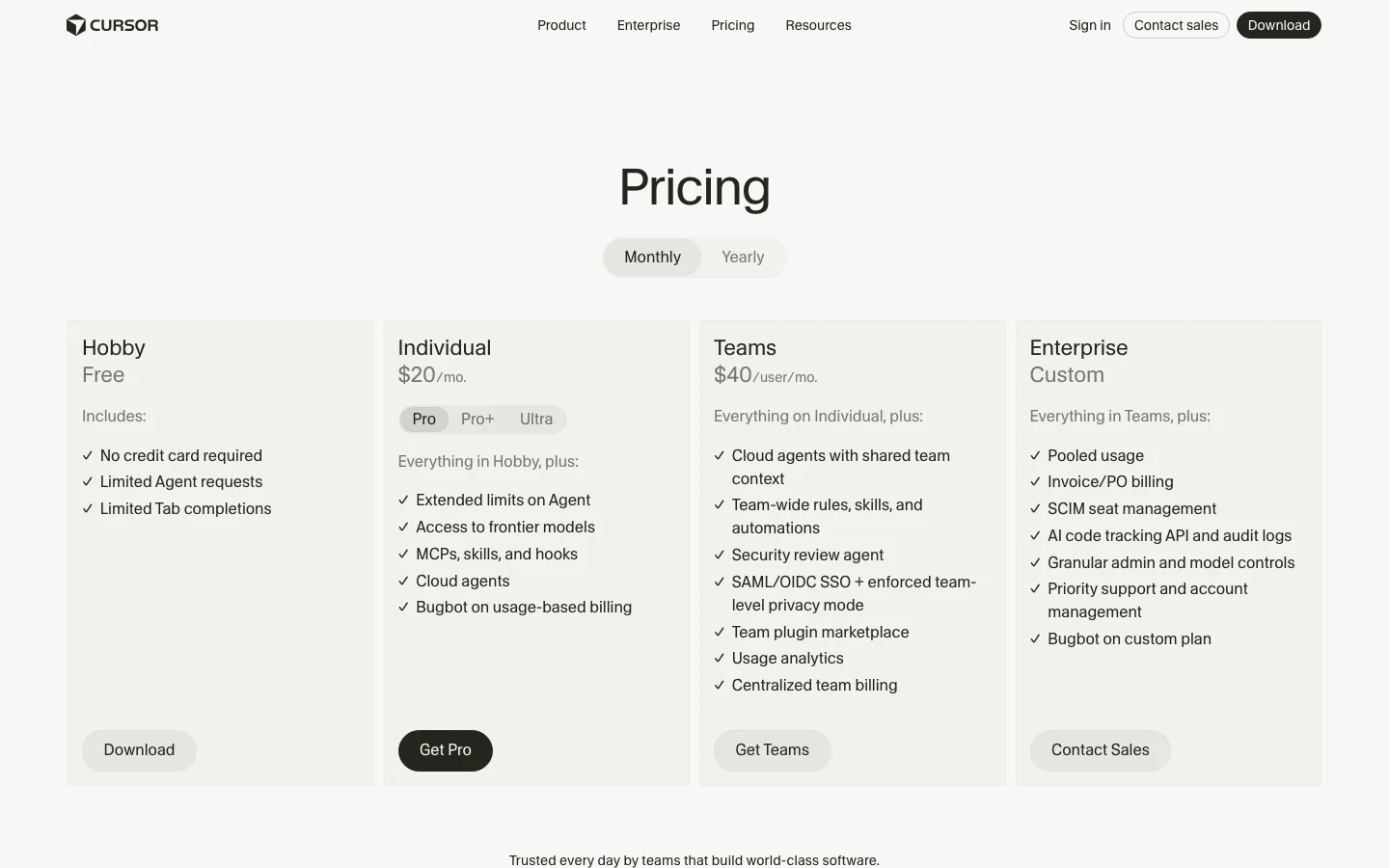
This review was produced independently by the Belreos editorial team. See how we score and test AI tools. Looking for more options? Browse all AI Coding Tools tools on Belreos.