Grammarly is an AI writing assistant that checks grammar, spelling, clarity, and tone across your browser, Microsoft Word, Google Docs, Outlook, Slack, and dozens of other apps, and it now also generates AI-assisted rewrites and suggestions rather than just flagging errors. It holds a 4.7/5 rating on G2 across a large review base, making it one of the most reviewed writing tools on the market, and it remains the tool most people think of first when they picture an AI grammar checker.
The short version: Grammarly's core grammar and clarity detection is still genuinely strong, but a real and cross-referenced "it got worse" narrative has built up around its newer AI-rewrite defaults. Writers on Reddit describe the tool smoothing their prose into something more generic, pushing suggestions harder than the older, quieter version of Grammarly did, and running laggier in the process. G2's own top complaint categories back this up independently: "Incorrect Corrections," "Inaccuracy," and "Poor" or "Irrelevant Suggestions" form one of the most-repeated complaint clusters in G2's con categories. If you're deciding whether Grammarly Pro is worth the money, that tension between "still accurate at the grammar level" and "increasingly pushy at the AI-suggestion level" is the thing to weigh, not the marketing pitch.
Belreos ran its own hands-on test of Grammarly on the free plan rather than relying on marketing claims alone: we planted 12 deliberate grammar and spelling errors in a test document, and Grammarly's free tier caught all 12. We also fed it a clean, voice-y paragraph with zero grammar issues and ran it through Grammarly's AI rewrite feature to see what "Improve it" actually does to writing that isn't broken. The result, detailed below, is the clearest evidence we found for the voice-flattening complaint that shows up across Reddit and G2. Our hands-on testing was done on Grammarly's free plan, so the grammar-detection and AI-rewrite findings below are firsthand; the Pro-tier assessment reflects feature availability and published pricing rather than firsthand Pro use.
Who Grammarly Is For
Students are one of the most consistent groups asking about Grammarly, specifically whether Pro is worth paying for creative or academic writing and whether AI-assisted edits could be flagged as AI use by a school's detection software. Professionals who write across email, docs, and Slack all day are the other dominant group, using Grammarly mainly for its integration breadth rather than any single standout feature. ESL and non-native English writers are a smaller but consistent third group who value the grammar and clarity layer more than the AI-rewrite suggestions.
If you want a grammar and clarity checker that follows you across the apps you already use without much setup, Grammarly fits. If you specifically want a tool that reliably preserves your own voice rather than nudging your writing toward a smoother, more generic version of itself, read the pain-points section below before you commit, since that's the exact complaint showing up most often right now. If what you actually need is heavy paraphrasing and rewriting with grammar checking as a secondary layer, rather than the reverse, QuillBot takes the opposite approach: paraphrase-first, with grammar built in, instead of Grammarly's grammar-first model with AI rewriting added on top. See our full QuillBot vs Grammarly comparison for the complete breakdown.
Weighing Grammarly against the rest of the field? See our Best AI Writing Tools 2026 roundup for a wider comparison.
What Grammarly Actually Does
- Grammar and spelling correction: the original core feature and still the best-reviewed part of the product, catching errors most spell-checkers miss.
- Clarity and tone detection: flags sentences that read as unclear, confusing, or mismatched in tone for the context you've selected (formal, casual, and others).
- AI writing prompts (GrammarlyGO / Superhuman Go): generates rewrites, replies, and full passages on request, scaling from 100 prompts a month on Free to 2,000 a month on Pro to unlimited on Enterprise.
- Plagiarism and citation support: available on paid plans, useful for students and anyone submitting original-work declarations.
- Browser extension and app integrations: Grammarly's biggest practical advantage is showing up wherever you're already typing, including Word, Google Docs, Outlook, and Slack, rather than requiring a dedicated tab.
The complaint pattern worth taking seriously is specifically about the AI-rewrite layer, not the underlying grammar engine. Reddit threads describe the newer default behavior as trying to take over more of the writing than just correcting it, one reader put it as the tool smoothing writing "to the most mundane version of itself." That's a different complaint than "Grammarly misses errors," and it's the one to weigh most heavily if voice and tone matter to your writing.
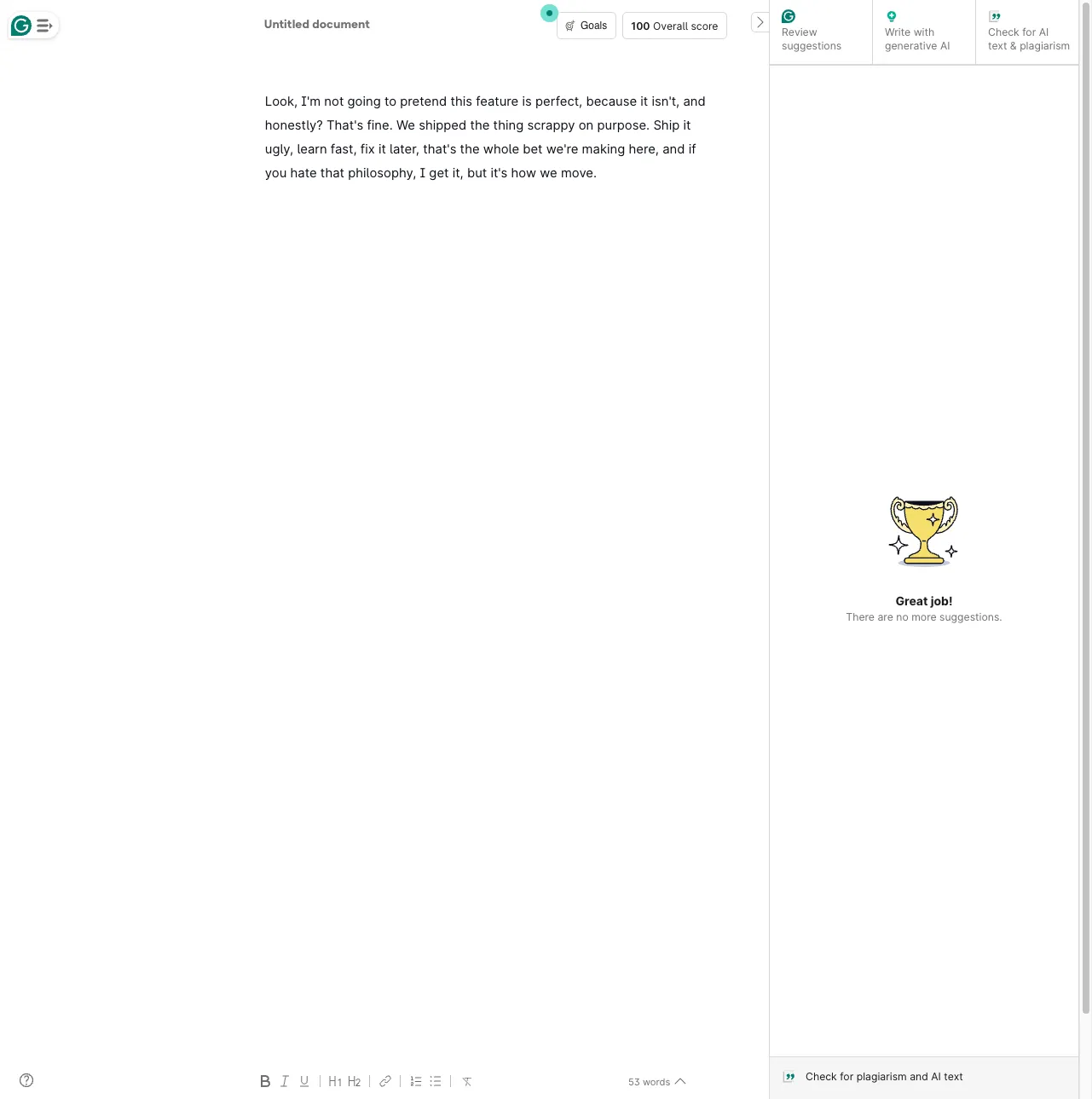
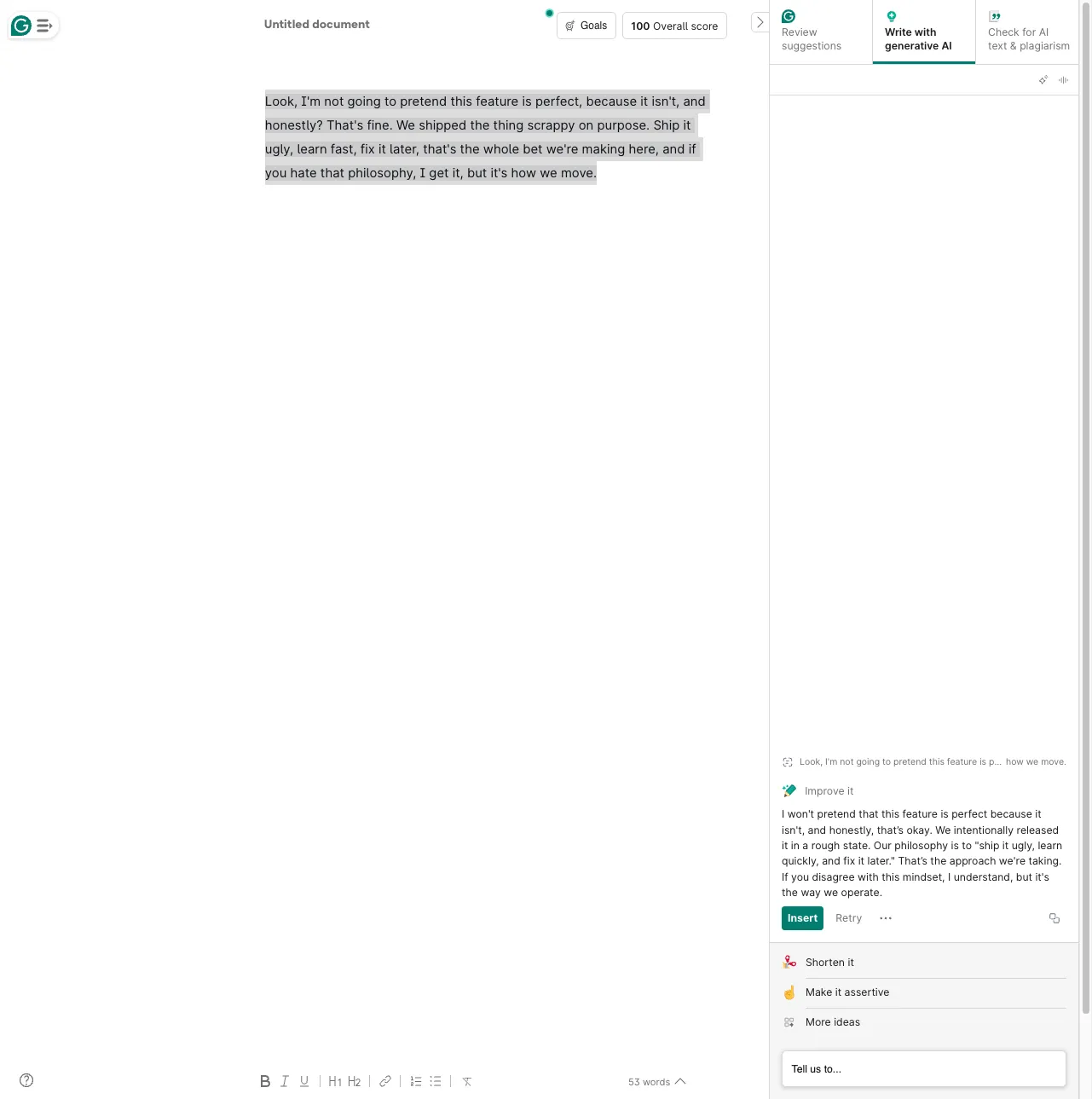
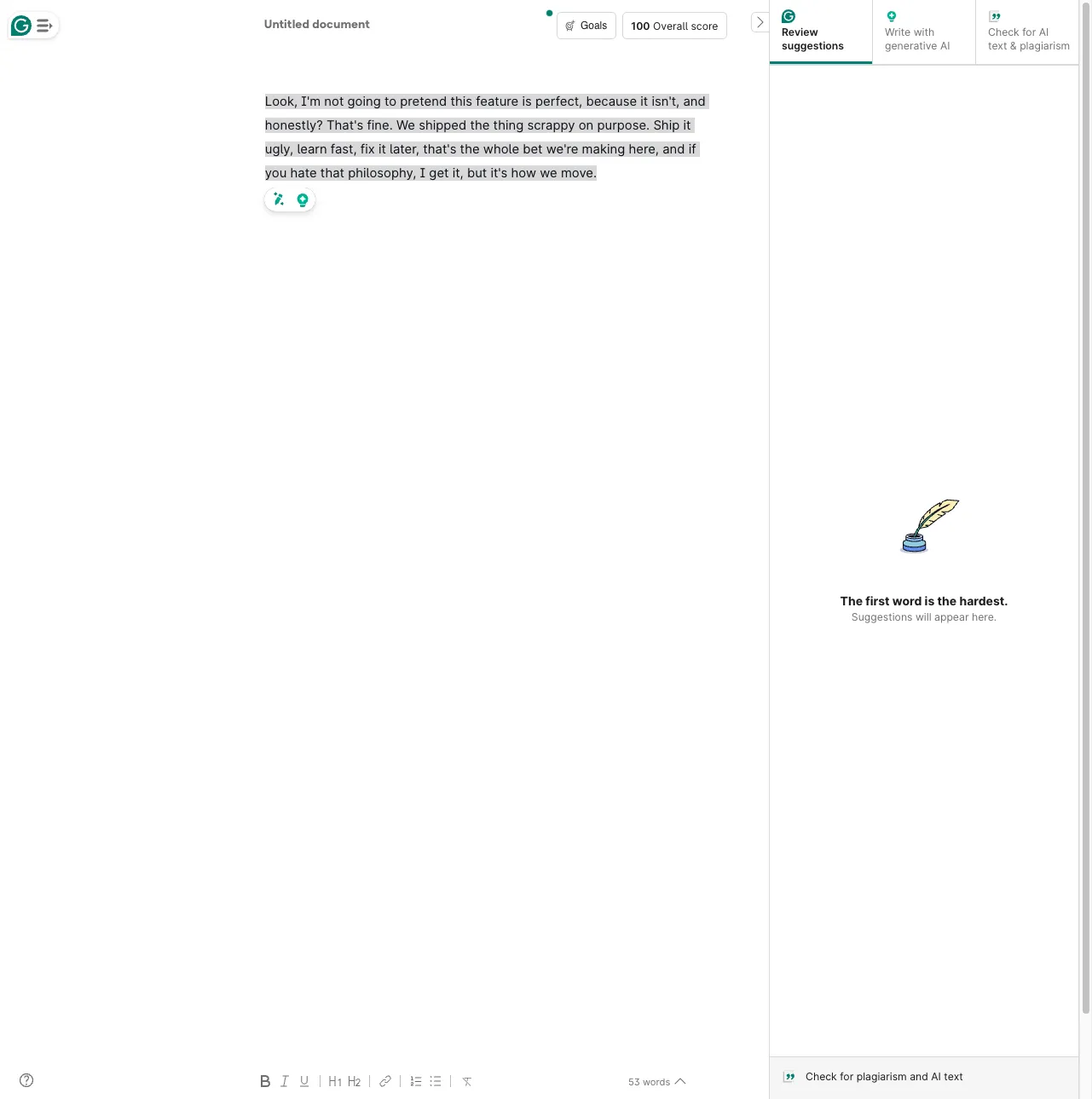
We tested this directly. We gave Grammarly a paragraph that scored 100% with zero suggestions, so there was nothing to correct, and asked its "Write with generative AI" feature to "Improve it." The original read: "Look, I'm not going to pretend this feature is perfect, because it isn't, and honestly? That's fine. We shipped the thing scrappy on purpose." The AI rewrite came back as: "I won't pretend that this feature is perfect because it isn't, and honestly, that's okay. We intentionally released it in a rough state." Every informal, personality-carrying word choice, "shipped scrappy on purpose" becoming "intentionally released in a rough state," the rhetorical "honestly?" losing its question mark and its edge, was swapped for a more neutral, corporate-safe equivalent. Nothing was grammatically wrong with the original; the rewrite didn't fix an error, it flattened a voice.
Grammarly does offer a mitigation for this: a "voice profile" setting inside the AI-rewrite panel meant to teach the tool your own style so its suggestions stay closer to how you actually write. It isn't configured by default and takes a multi-step setup most users skip, which is likely why the flattening complaint keeps showing up despite the feature existing to address it.
Grammarly Pricing in 2026
Grammarly's public pricing page (grammarly.com/plans) currently shows exactly three tiers: Free, Pro, and Enterprise. The older standalone "Business" tier no longer appears as its own plan on the pricing page, effectively folded into Pro-tier language, though "Grammarly Business" still exists as a marketing name on a separate product page.
| Plan | Price | What you get |
|---|---|---|
| Free | $0 | Grammar/spelling checks, tone detection, 100 AI prompts/month |
| Pro | $12 (headline; see billing note below) | 2,000 AI prompts/month, full clarity and tone suite, plagiarism checking on relevant plans |
| Enterprise | Custom - contact sales | Unlimited AI prompts, BYOK encryption, SAML SSO, SCIM, DLP, custom roles, audit log API, cost center visibility; built for 150+ seats |
One thing worth knowing before you subscribe: Grammarly's own public pricing page shows only a single "$12" figure for Pro, with no monthly-versus-annual toggle or billing breakdown anywhere in the visible page text. Checked directly on Grammarly's account and plan-selection pages, the standalone monthly (non-annual) price for Grammarly Pro is $30/month; the $12 figure shown on the marketing pricing page is the annual plan's monthly-equivalent rate, billed as $144 per year. If exact renewal terms matter to your decision, confirm them at checkout before entering payment details.
Separately, some Trustpilot review summaries describe billing friction, including being charged on renewal without a clear heads-up and difficulty getting refunds after cancellation. That signal comes from secondary sources rather than a page Belreos could verify directly this pass, so treat it as a pattern worth watching rather than a confirmed fact, and if you go with an annual plan, calendar your renewal date as a precaution regardless.
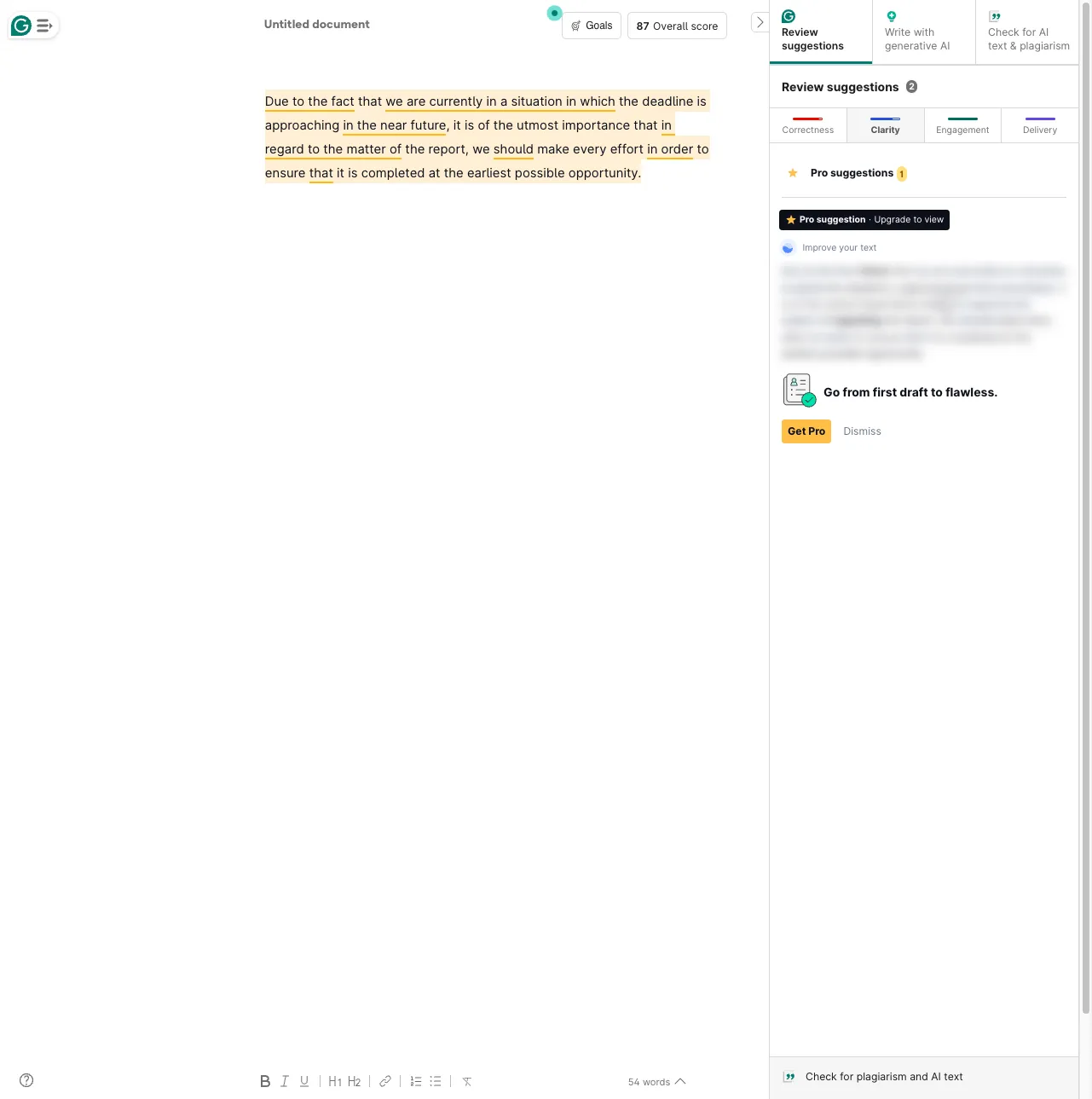
Worth knowing before you upgrade: the free tier flags clarity and wordiness problems, it just doesn't let you fix them. We fed Grammarly's free tier a wordy but grammatically clean paragraph, and it correctly underlined every bloated phrase in the Clarity tab, but the actual rewrite suggestion sat behind a blurred "Pro suggestion, Upgrade to view" card. The same applies to Grammarly's Goals settings: most "Domain" presets (Academic, Business, Email, Creative) are Pro-locked, with only "General" available for free.
Grammarly Pain Points and What to Watch For
- The AI-rewrite layer is polarizing. This is the single most cross-referenced complaint: Reddit threads and G2's own con categories both describe suggestions that feel over-eager, inaccurate, or voice-flattening, and Belreos reproduced it directly in hands-on testing (see above). If you write fiction, opinion pieces, or anything where your specific voice matters, test the free tier and see how the suggestions feel before paying for Pro, or set up Grammarly's voice-profile feature to reduce the flattening.
- Free-tier clarity fixes are Pro-gated. The free tier will tell you a sentence is wordy or unclear, but the actual rewrite is locked behind Pro, and most Goals "Domain" presets are Pro-only too.
- Newer UI reports of lag. Multiple Reddit comments describe the current interface as slower and more intrusive with upsell prompts than the older, quieter version of the product.
- Billing transparency gap. The public pricing page doesn't show a monthly-vs-annual breakdown, and some Trustpilot summaries describe renewal and refund friction. Confirm your actual billing terms at checkout, not from a marketing headline.
- A long-running privacy narrative around the browser extension. Hacker News threads from 2018 and 2022 questioning whether the extension behaves like a keylogger or over-shares tokens with websites keep resurfacing in search results. These are old reports, not new findings, but they're still actively linked and discussed, and it's fair for a security-conscious user to factor that history in.
The Superhuman Rebrand: What Actually Changed
On October 29, 2025, Grammarly's parent company renamed itself from Grammarly Inc. to Superhuman, following its acquisitions of Coda and the Superhuman email client. The consumer product you'd sign up for is still called Grammarly; nothing about the product name, login, or day-to-day experience changed for existing users. The practical relevance for a buyer is limited: it signals the parent company is building a broader productivity suite (Grammarly for writing, Coda for workspace, Mail for email, and a new AI assistant called Superhuman Go), but the tool reviewed here is unchanged by the corporate rename itself.
Is Grammarly Worth It in 2026?
Grammarly still earns its reputation on raw grammar and clarity detection, firsthand testing caught 100% of the errors we planted, and its integration breadth across browsers, Word, Docs, Outlook, and Slack remains close to unmatched among writing assistants. The honest complication is the newer AI-rewrite layer: a real, cross-referenced group of users feels it pushes suggestions too hard and smooths writing toward something more generic, and we reproduced that exact flattening effect directly in testing, which is different from the tool simply getting worse at catching typos. If your main need is dependable grammar and clarity checking that follows you everywhere, Grammarly Pro is a reasonable $12-headline buy, confirm the actual billing terms at checkout first, and remember that the free tier's clarity fixes (not just AI prompts) are Pro-gated. If you're a fiction writer, essayist, or anyone who has felt Grammarly nudging your voice in a direction you didn't want, try the free tier's suggestion settings before paying, set up a voice profile to counter the flattening, and give ProWritingAid a look as the alternative most often named by writers who made that switch.
Frequently Asked Questions
Is Grammarly Pro worth it?
Grammarly Pro is worth it if you write often enough that catching tone, clarity, and delivery issues (not just typos) saves you real editing time, and if you're comfortable with its AI-rewrite suggestions being on by default. If you only need basic spelling and grammar catches, the free tier or a lighter tool may cover you without the subscription.
Is there a free version of Grammarly?
Yes. Grammarly's free tier includes core grammar and spelling checks, tone detection, and 100 AI prompts per month, with no time limit on the free plan itself.
Grammarly vs ProWritingAid: which should I use?
Grammarly leads on integration breadth (browser, Word, Docs, Outlook, Slack) and raw grammar-detection accuracy. ProWritingAid is the tool Reddit writers most often name when they switch away from Grammarly, citing deeper style and prose-craft feedback for fiction and long-form writing without as much AI-rewrite pressure. Choose Grammarly for everyday correctness across many apps; choose ProWritingAid if you want a slower, more style-focused editing pass.
Is Grammarly safe for academic writing?
Grammarly can help with grammar, clarity, and citation-adjacent issues, but no writing assistant, Grammarly included, can guarantee your work will pass a specific school's AI-detection software, and some students report inconsistent flagging. Check your institution's specific policy on AI writing tools before relying on Grammarly for graded work, and treat any AI-detector score as a rough signal rather than a precise measurement.
Did Grammarly get worse?
There's a real, cross-referenced pattern of complaints on Reddit and in G2's own con categories about newer AI-rewrite defaults producing over-eager or flattening suggestions, alongside a laggier interface than the older, grammar-only version of the product. Belreos reproduced the flattening complaint directly: a clean, voice-y test paragraph with zero grammar issues came back from Grammarly's AI rewrite with every casual, personality-carrying word swapped for a more neutral, corporate-safe equivalent. Grammarly's core grammar-checking accuracy remains well-rated and firsthand-verified (G2: 4.7/5; Belreos caught 100% of planted test errors), so the honest read is that the underlying correction engine hasn't degraded, but the newer AI-suggestion layer is polarizing enough that it's worth testing on the free tier before you commit to Pro. Grammarly does offer an opt-in "voice profile" feature meant to reduce this flattening, but it's off by default and most users never set it up, which likely explains why the complaint keeps resurfacing.
- Broad integration footprint across browsers, Word, Google Docs, Outlook, and Slack
- Strong core grammar and clarity detection (G2: 4.7/5), firsthand-verified: Belreos planted 12 deliberate errors and the free tier caught all 12
- Genuine free tier with tone detection and 100 AI prompts a month, though clarity/wordiness fixes beyond basic grammar are Pro-gated
- Enterprise tier adds BYOK encryption, SAML SSO, SCIM, DLP, and an audit log API
- AI prompt allotments scale predictably by tier (100 -> 2,000 -> unlimited)
- Visible, recurring Reddit narrative that AI-rewrite defaults flatten writers' voice, reproduced firsthand: a clean, voice-y test paragraph came back from the AI rewrite with every casual word swapped for a neutral, corporate-safe synonym
- G2 con categories show a large, recurring cluster of incorrect/irrelevant-suggestion complaints
- Free tier flags clarity/wordiness issues but locks the actual rewrite/fix behind Pro, and most Goals "Domain" presets are Pro-only too
- Pricing page shows only a headline $12 price with no visible monthly/annual breakdown
- ProWritingAid is repeatedly named as the switch-to alternative on Reddit
- Old but still-resurfacing browser-extension privacy concerns (2018/2022 HN threads)
Students, professionals, and ESL writers who want grammar and clarity checking across browser, desktop, and Office/Google Docs, with the option to dial back its AI-rewrite suggestions.
Visible, recurring Reddit narrative that AI-rewrite defaults flatten writers' voice, reproduced firsthand: a clean, voice-y test paragraph came back from the AI rewrite with every casual word swapped for a neutral, corporate-safe synonym. G2 con categories show a large, recurring cluster of incorrect/irrelevant-suggestion complaints.
Pricing
As of Oct 2026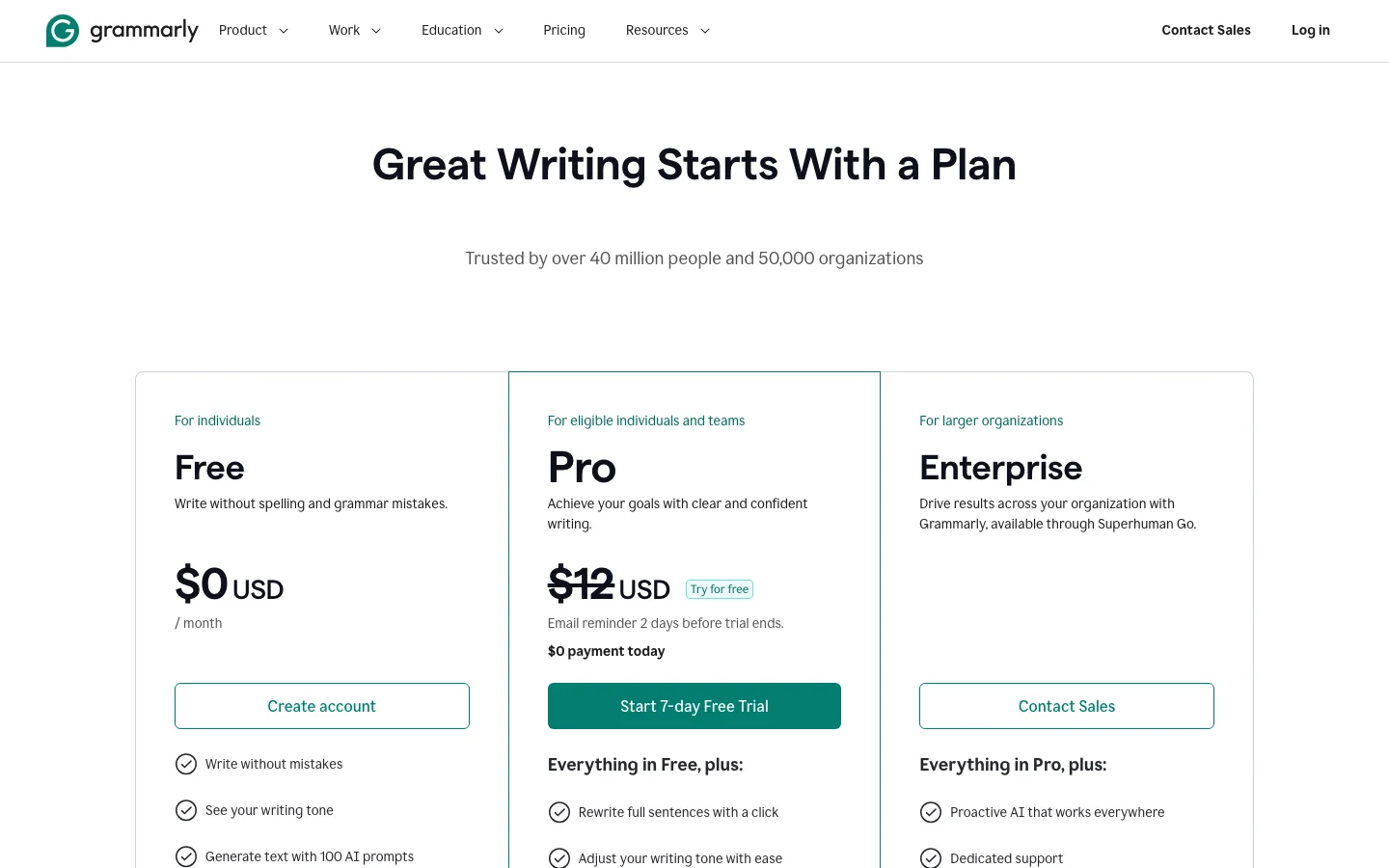
This review was produced independently by the Belreos editorial team. See how we score and test AI tools. Looking for more options? Browse all AI Writing Tools tools on Belreos.