
Gamma AI Review 2026: The Fastest Way to Build a Deck (But Can You Export It?)
Gamma is the tool people reach for when they need a presentation in the next ten minutes. Type a prompt, wait under a minute, and you have a styled, shareable deck. That speed is real, and it is the main reason Gamma has grown to more than 70 million users and roughly $100M in annual revenue by 2026. That growth pushed its valuation to $2.1B in a late-2025 Series B round. But speed is only half the story, and the other half is where most reviews go quiet: what happens when you need that deck as an actual PowerPoint file.
This review is built around that tension. Gamma is genuinely excellent at one thing and genuinely frustrating at another, and which half matters more depends entirely on how you plan to share your work.
TL;DR Verdict
Use Gamma if you share presentations as links, you value speed over pixel-level design control, and you want interactive embeds like Figma, Miro, or YouTube living inside your slides. For web-native decks it is the fastest tool in the category.
Look elsewhere if your organization runs on PowerPoint files, you need precise design control, or you present offline. Gamma's PPTX export is its weakest link, and that is not a small caveat if PowerPoint is your delivery format.
What Gamma does well
| Strength | What it means in practice |
|---|---|
| Prompt-to-deck speed | Idea to shareable deck in under a minute. The fastest AI presentation generator we tested in 2026. |
| Web-native embeds | Drop live Figma, Miro, Airtable, Power BI, YouTube, Typeform, and Calendly content directly into slides. PowerPoint cannot do this. |
| Gamma Agent | A conversational AI design partner that can research the web, restyle a whole deck, and make edits through plain-language requests. |
| More than slides | The same interface also generates documents, one-page websites, and social posts. |
The through-line is speed plus interactivity. If your deck lives on the web as a shared link, Gamma gives you things a traditional slide tool simply cannot, and it gives them to you fast.
Where Gamma frustrates people
PowerPoint export is broken, and it is the number one complaint. When you export to PPTX, the interactive features vanish and the layout conversion from Gamma's scrollable cards to fixed 16:9 slides introduces broken text boxes, resized images, and missing elements. If your final format is a .pptx file, this is a real problem, not a rough edge.
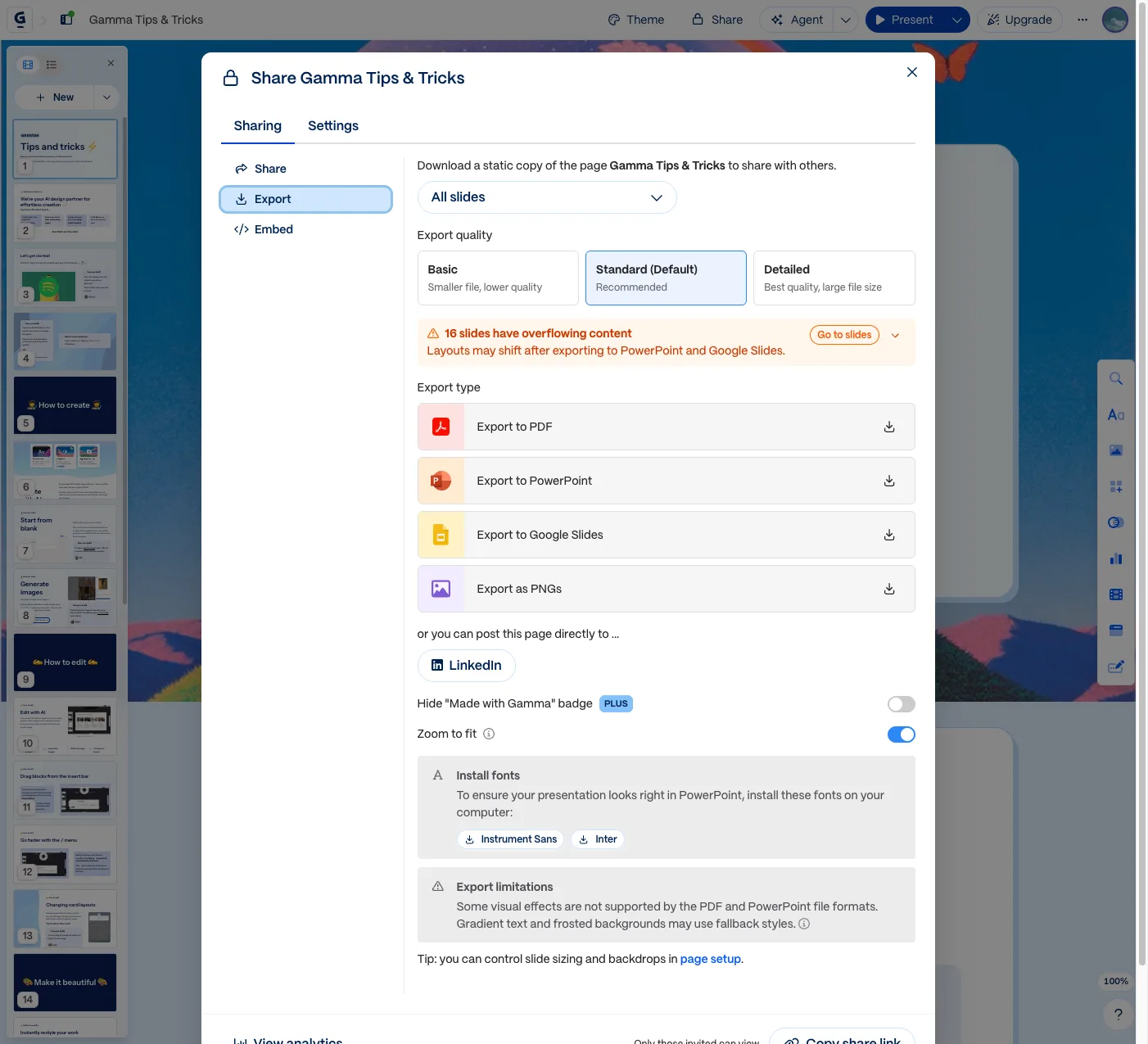
This is Gamma's own warning, shown on one of Gamma's own sample decks, not a bug we went looking for. The Export limitations panel goes further: some visual effects are not supported, gradient text and frosted backgrounds may use fallback styles, and Gamma prompts you to install Instrument Sans and Inter locally so the fonts match.
Design control is limited compared to Canva or Beautiful.ai. You are trading fine-grained customization for generation speed, which is the right trade for some users and the wrong one for others.
The scrollable card format is polarizing. It is great for web sharing and alienating for anyone who expects traditional slides. There is also no offline mode, so Gamma is fully cloud-dependent.
Pricing
| Plan | Price | Key features |
|---|---|---|
| Free | $0 | 400 AI credits, Gamma branding on every export |
| Plus | $9/mo annual ($12 monthly) | 1,000 monthly credits, no branding, advanced image models |
| Pro | $18/mo annual ($25 monthly) | 4,000 monthly credits, premium AI models, custom branding, analytics, API, custom domains |
| Ultra | $90/mo annual ($100 monthly) | 20,000 monthly credits, most advanced models, 100 custom domains, early access |
The free tier is a genuine trial rather than a demo, but the Gamma branding on exports pushes most regular users to Plus. At $9 a month, Plus is an easy yes for the speed alone. Pro earns its price only if you need custom branding, analytics, or the API.
How Gamma compares
| Tool | Best for | Trade-off vs Gamma |
|---|---|---|
| Gamma | Fast, web-native, interactive decks | Weak PPTX export, limited design control |
| Beautiful.ai | Brand-consistent team decks | Less AI-generative, more rules-based |
| Canva | Design flexibility and templates | AI presentation is a feature, not the core product |
| Gemini Notebook | Slides grounded in your own documents | Free and accurate, but far less polished output |
Gamma's closest historical rival, Tome, shut down its slides feature in 2025, which cleared the lane for Gamma at the speed-first end of the market. Beautiful.ai is the pick for teams that need brand consistency, and Canva is the pick when you want to hand-craft the design. If speed and web sharing are your priorities, Gamma wins.
Who should use Gamma?
- Startup founders pitching over a link → Gamma, easily.
- Educators and marketers making quick internal decks → Gamma.
- Anyone who must deliver a polished .pptx file → Canva or PowerPoint, not Gamma.
- Teams that need strict brand consistency → Beautiful.ai.
Gamma is a specialist that happens to be enormously popular. It is the fastest way to get a good-looking presentation onto the web, and as long as the web is where your deck is going to live, it is hard to beat. Just do not buy it expecting a clean PowerPoint export. For more tools that speed up day-to-day work, see our roundup of the best AI tools for small business in 2026.
Frequently asked questions
Is Gamma AI worth it in 2026?
For anyone who shares presentations as web links, yes. Gamma generates a styled, interactive deck from a prompt in under a minute, which is faster than any competitor we tested. It is less worth it if you need to deliver PowerPoint files, because its PPTX export drops interactive features and often breaks the layout.
Can Gamma export to PowerPoint?
It can, but this is Gamma's biggest weakness. Exporting to PPTX removes interactive embeds and converts Gamma's scrollable cards into fixed 16:9 slides, which frequently introduces broken text boxes, resized images, and missing elements. If PowerPoint is your required format, Gamma is not the right tool.
How much does Gamma AI cost?
Gamma has a free tier with 400 AI credits and Gamma branding on exports. Paid plans start at $9 a month (billed annually) for Plus, which includes 1,000 monthly credits and removes branding. Pro is $18 a month annually and adds premium models, analytics, custom branding, and API access.
What is the best alternative to Gamma?
It depends on what Gamma is missing for you. Choose Beautiful.ai for brand-consistent team decks, Canva for maximum design flexibility and templates, or Gemini Notebook (formerly NotebookLM) if you want free slides generated from your own documents. Each trades some of Gamma's speed for a strength Gamma lacks.