Wispr Flow Review 2026: The Best AI Dictation Tool (With a Privacy Catch)
Most AI tool reviews are positive fluff. This one cannot be, because Wispr Flow is genuinely one of the best dictation tools available in 2026 and also the subject of a privacy controversy that has been racking up hundreds of upvotes on Reddit. Both things are true at once, and pretending otherwise would not help you decide. So this review gives you the productivity case and the privacy case side by side, and lets you weigh them for your own situation.
The short version: if you produce a lot of written content and you are not handling sensitive data, Wispr Flow is exceptional. If you work with confidential information, the way it achieves that polish should give you pause.
TL;DR Verdict
Use Wispr Flow if you write constantly across many apps, you want dictation that cleans itself up as you speak, and you are comfortable with cloud processing. For sheer output quality it is the best in the category.
Avoid it if you handle confidential or regulated data, you need offline dictation, or the idea of a screenshot of your screen being sent to the cloud with each dictation is a dealbreaker. In that case, an on-device tool like Superwhisper is the safer pick.
What makes Wispr Flow good
| Strength | What it means in practice |
|---|---|
| 150+ WPM with cleanup | Removes filler words, adds punctuation, and fixes backtracking so "meet Tuesday, wait, Wednesday" becomes "meet Wednesday". |
| Context-aware tone | Writes casually in Slack, formally in email, and technically in a code editor, adapting per app. |
| Truly cross-platform | Mac, Windows, iOS, and Android. As of 2026 it is the only major AI dictation tool on all four at once. |
| System-wide | Works in any text field in any app, not locked to a single platform, plus 100+ languages with code-switching. |
The intelligent cleanup is what separates Wispr Flow from built-in options like Apple Dictation. You speak naturally, hesitations and all, and what lands on the page reads like you edited it. For people who think faster than they type, that is a real 3x to 5x speed gain on written output.
The privacy catch you need to understand
Here is the part most reviews skip. To power its context awareness, Wispr Flow reads your active app and sends context data, including a screenshot, to Wispr's servers as part of each dictation request. Context Awareness ships on by default, and according to Wispr's own documentation the context sent with each request can include the app you are using, textbox contents before and after your cursor, on-screen text, variable and file names in coding apps, a screenshot, and conversation history, unless you have turned on Privacy Mode. This is documented, it has been the subject of viral Reddit threads, and it is the single biggest controversy around the product. Your audio is also processed in the cloud, on third-party infrastructure disclosed in Wispr's subprocessor list, and there is no offline fallback. You can turn Context Awareness off entirely under Settings → Data and Privacy.
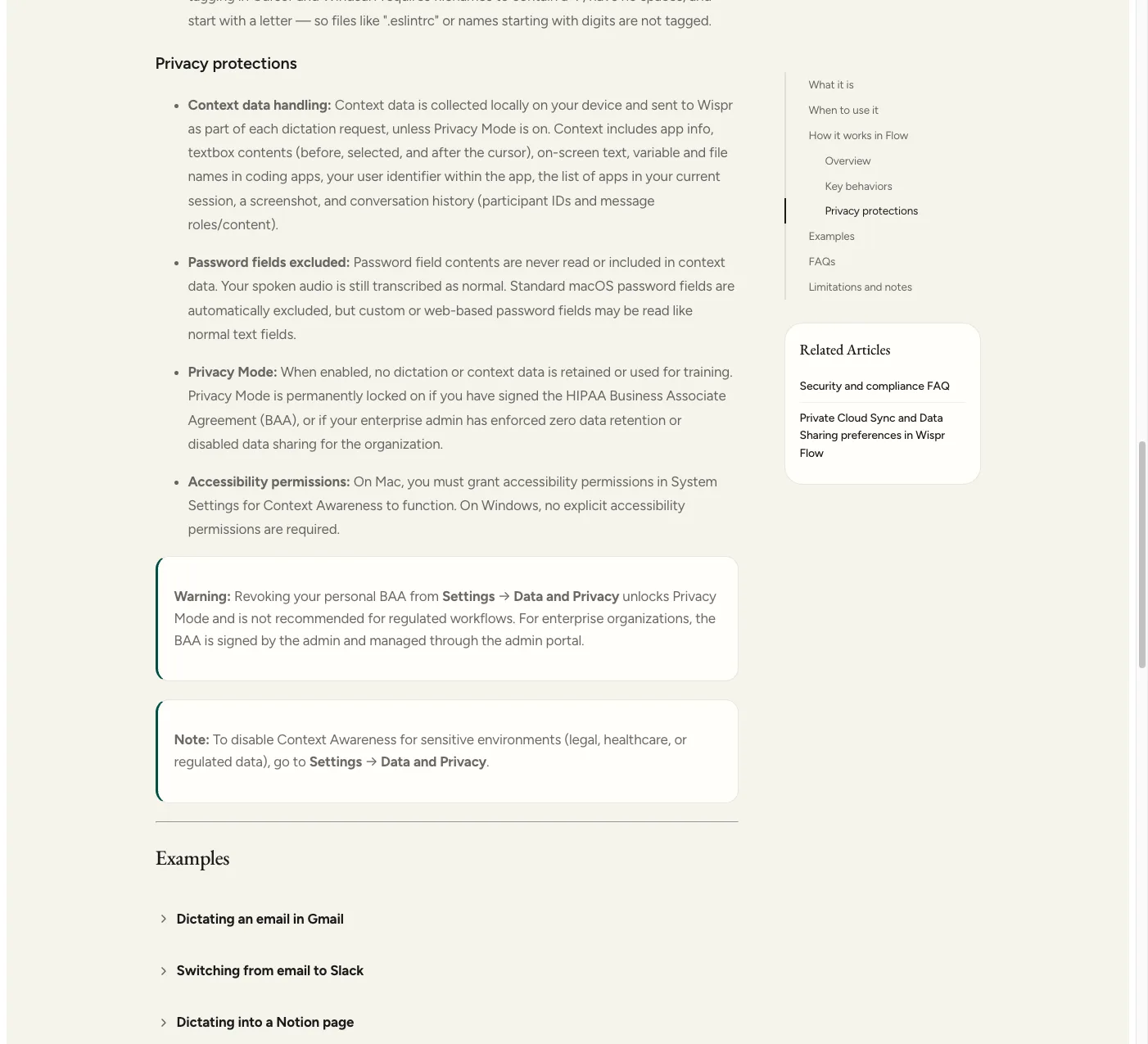
Wispr's own documentation on what gets sent with each dictation request.
One detail is easy to miss: standard macOS password fields are automatically excluded from context capture, but Wispr's documentation notes that custom or web-based password fields may be read like normal text fields. If you are logging into something through a browser-based form rather than a native macOS password box, do not assume it is excluded the way a native password field is.
There is a real mitigation available. Privacy Mode stops any dictation or context data from being retained or used for training. It is permanently locked on if your account has a signed HIPAA Business Associate Agreement, or if your enterprise admin has enforced zero data retention or disabled data sharing for the organization. For legal, medical, or otherwise regulated work, Privacy Mode plus a signed BAA is the closest Wispr Flow gets to a compliant setup, though it is opt-in rather than the default.
That design has two practical consequences beyond the privacy question. First, everything requires an active internet connection. Second, the cloud round-trip adds one to two seconds of latency, which is fine for dictating paragraphs but noticeable if you want word-by-word feedback.
None of this makes Wispr Flow malware. It makes it a poor fit for anyone who handles confidential client data, legal or medical information, or anything under a compliance regime. For a personal blog or casual writing, the trade-off may be perfectly acceptable. For regulated work, it is likely a hard no.
Where Wispr Flow's SOC 2 audit stands
A separate compliance question surfaced in March 2026, when an anonymous Substack investigation alleged that Delve, an AI-driven compliance automation platform, had produced near-identical boilerplate SOC 2 reports for roughly 494 startups. Wispr Flow is one of the companies identified by name in the resulting investigation, and Wispr's own compliance FAQ confirms its prior SOC 2 Type II and ISO 27001 certifications were invalidated in March 2026 "due to platform integrity concerns at the original auditor," the same month the Delve allegations broke. Wispr has since engaged A-LIGN, a widely used SOC 2 auditor, to run a fresh independent audit; the company's own compliance update confirms SOC 2 Type I is complete with a clean opinion and that the SOC 2 Type II re-audit and ISO 27001 certification are both in progress with A-LIGN. If regulatory compliance is the reason you are evaluating Wispr Flow, treat the original SOC 2 report as provisional until that new audit is complete.
Pricing and alternatives
| Tool | Price | Privacy model |
|---|---|---|
| Wispr Flow | $12/mo annual ($15 monthly) | Cloud processing, screenshot context |
| Superwhisper | $8.49/mo or $250 lifetime | Fully on-device (Whisper Large V3 Turbo) |
| MacWhisper | $59 one-time | On-device, file-based (not real-time dictation) |
| Apple Dictation | Free | Built-in, but no cleanup or context awareness |
At $12 to $15 a month, Wispr Flow is the most expensive option in the category, and its free plan caps you at 2,000 words a week, which is barely enough to evaluate it. The clearest alternative is Superwhisper, which runs Whisper entirely on your device for less money and no cloud exposure. The catch is that on-device tools ask more of your hardware and generally lack Wispr Flow's polish and cross-app tone adaptation. That is the whole decision in one line: convenience and polish in the cloud, or privacy and control on-device.
Who should use Wispr Flow?
- High-volume writers and content creators (non-sensitive) → Wispr Flow, for the output quality.
- Developers who dictate across many apps → Wispr Flow, if cloud processing is acceptable.
- Anyone handling confidential or regulated data → Superwhisper or another on-device tool.
- Budget-conscious users who want a one-time cost → MacWhisper or Superwhisper's lifetime plan.
Wispr Flow earns its reputation. It is fast, polished, and available everywhere, and for the right user it is a genuine productivity upgrade. Just go in with both eyes open about how it achieves that, and pick an on-device alternative if your data cannot leave your machine. If your writing workflow needs more than dictation, our best AI writing tools of 2026 roundup covers the drafting side.
Frequently asked questions
Is Wispr Flow safe to use?
For non-sensitive writing, it is generally considered safe and highly rated. The important caveat is that Wispr Flow sends a screenshot with each dictation request and processes both those screenshots and your audio in the cloud. That is fine for casual content but a poor fit for confidential, legal, medical, or regulated data. If you handle sensitive information, an on-device tool is safer.
Why does Wispr Flow take screenshots?
Wispr Flow's Context Awareness feature reads your active app and sends context data, including a screenshot, to Wispr's servers as part of each dictation request, not on a timer. This is what lets it adapt tone per app and understand what you are working on. Context Awareness is on by default but can be turned off under Settings → Data and Privacy. It is the tool's most controversial feature and the main reason privacy-focused users choose alternatives like Superwhisper.
Wispr Flow vs Superwhisper: which is better?
Wispr Flow has the more polished experience, better tone adaptation, and wider platform support, but it processes everything in the cloud and takes screenshots for context. Superwhisper runs Whisper fully on your device, costs less ($8.49 a month or $250 lifetime versus $12 to $15 a month), and keeps your data local. Choose Wispr Flow for polish, Superwhisper for privacy.
How much does Wispr Flow cost?
Wispr Flow has a free plan limited to 2,000 words a week. The Pro plan is $12 a month billed annually, or $15 month to month, and includes unlimited dictation, all languages, and context awareness. A Teams plan is $10 per user per month annually with a three-seat minimum. It is the priciest option in the AI dictation category.