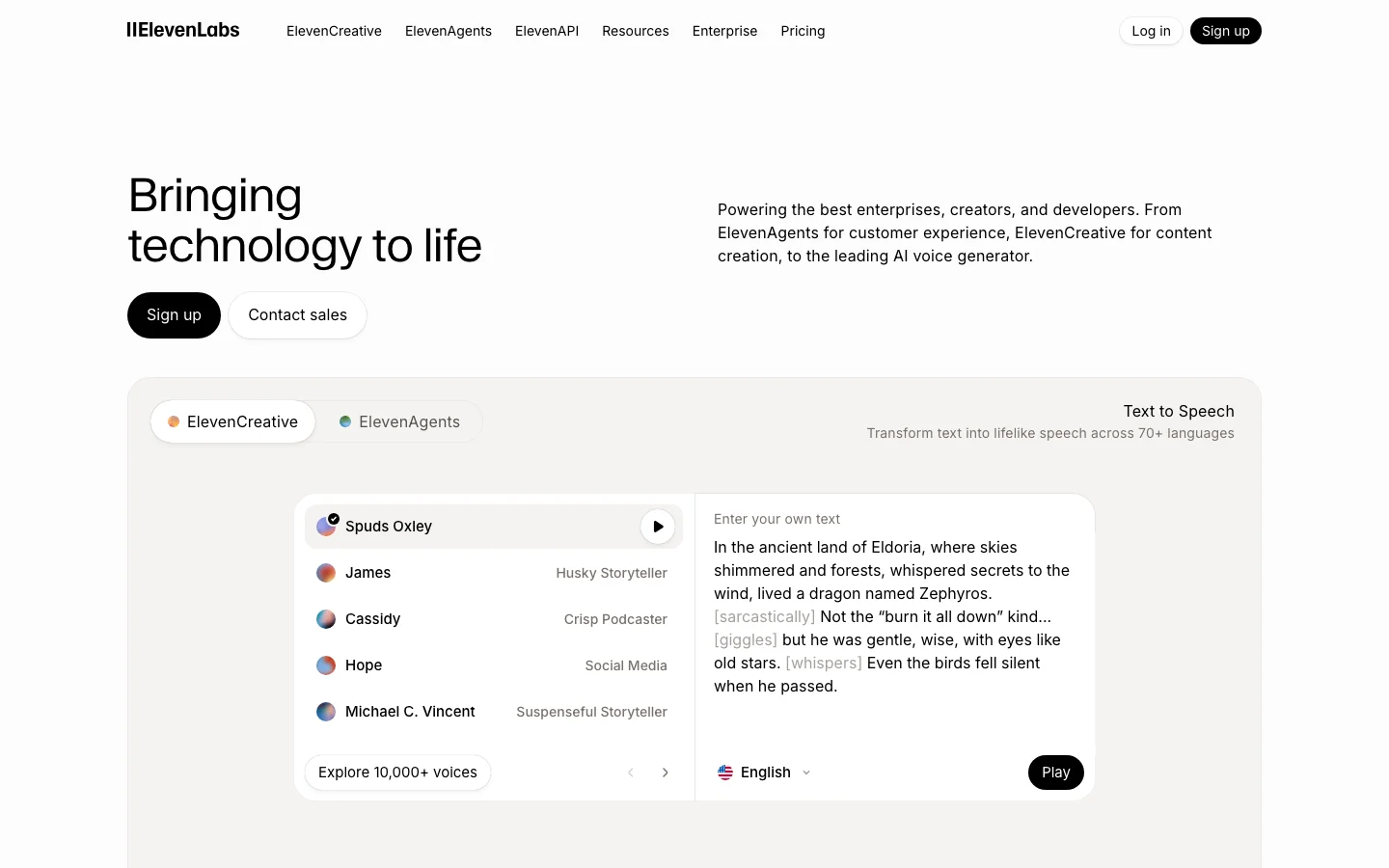
ElevenLabs is the quality benchmark for AI text-to-speech, and that sentence is not marketing copy -- it is just how the market is positioned. Every competitor in the AI voice generation category is defined by how close it gets to ElevenLabs. Not the other way around. We have tested a lot of voice tools across this category, and the gap at the top is real.
The Eleven v3 model handles emotional range, accent control, multi-character dialogue, and symbol reading -- numbers, URLs, phone numbers -- at a level that nothing else in cloud TTS currently matches. An indie filmmaker cloned an actor's voice from 20 minutes of clean dialogue and used the output for ADR in a production film. A Skyrim modding community called the v3 upgrade "massive" for narrative emphasis and multi-character scenes. These are production users publishing results publicly, not beta testers praising a press release.
One meaningful update entering 2026: ElevenLabs expanded the Creator plan character allowance from 110,000 to approximately 440,000 characters per month on Flash and Turbo models. That changes the value calculation for mid-volume creators who previously found Creator too limiting. The tool that was cost-competitive only for lower-output users is now viable for substantially higher monthly volumes.
What Makes ElevenLabs Different
Voice quality is the obvious answer, but it understates what is actually happening at the model level. The Eleven v3 model produces output that handles prosody -- the rhythm, stress, and intonation of natural speech -- in a way that other TTS systems approach but do not match. The practical effect: ElevenLabs narration holds listener attention longer because it does not sound like narration. It sounds like a person speaking with intent.
The Voice Library marketplace is a differentiator with no direct equivalent in the category. Voice clone creators upload their voices, set a royalty rate, and earn passive income per 1,000 characters generated using their voice. Multiple creators have confirmed payouts exceeding $1,000 over five months from a portfolio of eight clones. This creates a revenue angle that makes ElevenLabs interesting not just as a tool but as a platform with network effects.
The developer ecosystem is the third differentiator that matters. The full REST API on Creator plan and above gives programmatic access to voice generation, voice cloning, speech-to-speech, and conversational AI. No other TTS tool at this price point has the same API surface area. The MCP server integration -- which enables ElevenLabs voices to be called directly from Claude and other AI assistant workflows -- is something no competitor currently offers.
ElevenCreative and ElevenAgents have expanded significantly through 2026. ElevenCreative now includes Music Generation alongside voice, positioning ElevenLabs as a broader audio platform. ElevenAgents supports production phone agent deployments with SIP trunking, batch calling, Pronunciation Dictionaries, and webhook-driven workflows -- a full conversational AI platform built on top of the TTS core. If you are building a voice-first product, ElevenLabs is the platform, not just the API.
ElevenLabs Pricing 2026: Every Plan Explained
ElevenLabs pricing in 2026 runs from $0 (Free) to $990/month (Business), with a custom Enterprise tier above that. Starter at $6/month is the entry point for commercial use. The Free plan covers non-commercial work only.
Plan
Monthly price
Characters/mo
Seats
Key feature
Free
$0
10,000
1
Non-commercial only. No voice cloning. Hard cap at 10K chars.
Starter
$6/mo
30,000
1
Commercial license, Instant Voice Cloning, API access, 20 Studio projects.
Creator
$22/mo ($11 first month)
121,000 (standard models; ~440,000 on Flash/Turbo at 0.5 credits/char)
1
Professional Voice Cloning (1 slot), 192 kbps output, overage billing enabled.
Pro
$99/mo
600,000
1
44.1 kHz PCM output, priority processing, 160 custom voice slots.
Scale
$299/mo
1,800,000
3
3 workspace seats, 3 Pro Voice Clones, team collaboration features.
Business
$990/mo
6,000,000
10
Low-latency TTS endpoint, 10 Pro Voice Clones, 10 seats.
Enterprise
Custom
Negotiated
Custom
HIPAA BAAs, custom SSO, SLAs, dedicated support.
Credits roll over for up to 2 months (maximum balance: 3x your monthly quota). They are shared across all ElevenLabs products: TTS, speech-to-text, dubbing, and sound effects. Flash and Turbo models consume 0.5 to 1 credit per character; Multilingual v2 and v3 models consume 1 credit per character. That difference matters when planning your monthly usage.
Annual billing discounts exist for Pro and Scale. Specific annual figures are not surfaced on the official pricing page, so those rates are not stated here. Check elevenlabs.io/pricing for current annual pricing before committing.
What changed in November 2025
ElevenLabs went through three pricing restructurings in 2025, which explains the volume of "elevenlabs pricing" searches. In January 2025, credits were split by model, creating billing confusion. August 2025 reunified credits across models. The most significant change came in November 2025: Conversational AI / Agents minutes shifted from pure per-minute billing into the plan structure at each tier. If you use ElevenAgents for phone or voice chatbot applications, that change affects how your usage is billed. In December 2025, ElevenLabs also cut API and Agents pricing substantially, with Flash model costs dropping by roughly 55% for API usage.
Which plan do you actually need?
Free works for evaluation and non-monetized personal projects. The moment you put audio on a monetized YouTube channel, sell an audiobook, or use ElevenLabs output for client work, Starter at $6/month is the minimum. Creator at $22/month is the practical choice for most individual content creators: 121,000 characters per month at standard quality, Professional Voice Cloning (one slot), full API access, and commercial rights. The first month is available at 50% off ($11), making it low-risk to test. Pro at $99/month makes sense for high-volume producers, developers who need broadcast-quality 44.1 kHz PCM output, and production studios where processing speed matters. Scale at $299/month adds two extra seats and roughly 3x the character quota versus Pro. It is the first team tier.
Hidden costs on ElevenLabs
Four things the pricing page does not make obvious:
Overage billing on Creator and above. Free and Starter plans hard-cap at their character limits. Creator, Pro, Scale, and Business allow overages. Rates vary by model. Variable production months create unpredictable bills.
Model credit rates differ. Flash v2.5 uses half the credits of Multilingual v2. Using a higher-quality model by default can exhaust your monthly quota faster than expected.
LLM costs on Agents are separate. When using ElevenAgents with GPT-4, Claude, or another LLM backbone, you pay the LLM provider separately through your own API keys. The ElevenLabs plan covers voice synthesis only.
Professional Voice Cloning requires real recording time. Creator gives you one PVC slot. The quality that makes PVC worthwhile requires roughly 30 minutes of clean audio and multiple processing rounds. A 2-minute clip produces Instant Voice Cloning fidelity, not PVC fidelity.
Switching from PlayHT to ElevenLabs?
PlayHT discontinued data exports on December 31, 2025, with accounts locked in 2026. ElevenLabs is the most common migration target. For equivalent commercial functionality, Creator at $22/month covers the voice quality and cloning capability that PlayHT's paid tiers provided, with a more mature developer API and a larger voice library. Instant Voice Cloning means you can recreate a voice from a recording sample without waiting for the Professional Voice Cloning pipeline.
ElevenLabs Pricing: Is It Worth It?
A lot of people arrive here after searching for ElevenLabs alternatives. At $22/month for the Creator plan, ElevenLabs is not free and not cheap. One Reddit thread in r/ElevenLabs titled "ElevenLabs is killing my budget" collected 241 upvotes and 181 comments in the past year. The frustration is real and widely shared.
Before writing it off on price, here is where the money actually goes. The v3 model produces voice output with prosody, emotional range, and accent control that no competing cloud TTS product currently matches at this price point. That gap matters most for two use cases: voice cloning and long-form narration where the output will face a real audience. If you are producing audiobooks, podcast episodes, YouTube narration, or documentary voiceover, listeners will notice the difference. If you are generating error messages for a software UI, they probably will not.
The credit system is the legitimate source of frustration. Character-to-credit conversion varies by model, which creates planning friction. The v3 model is non-deterministic: the same input can produce noticeably different output on consecutive generations, so batch workflows for audiobooks or training series require QA time and regeneration budget. That is a real cost on top of the subscription fee.
One update that changes the value calculation for mid-volume creators: ElevenLabs expanded the Creator plan to approximately 440,000 characters per month on Flash and Turbo models. That is enough for a full audiobook per month, a weekly podcast with room to spare, or consistent YouTube narration at volume. The first month is available at 50% off ($11 instead of $22), making evaluation low-risk.
If the price does not work for your volume or budget, here are the alternatives worth your time:
Murf AI ($19/month annual, or $29/month on monthly billing): cleaner billing model, predictable generation hours, no credit anxiety. The voice quality is below ElevenLabs but solid for corporate e-learning, training modules, and business narration. The right call if you need a team workflow and do not need expressive narration or voice cloning.
Lovo AI (Genny) ($24/month, paid plans): TTS plus a built-in video editor, stock footage library, and AI scriptwriter under one subscription. The English naturalness ceiling is lower than ElevenLabs, but if you are currently paying for four separate tools to produce narrated video content, the consolidation saves money. Note the active class action lawsuit context in our full voice generator comparison.
Vozo AI: aimed at video dubbing and translation workflows rather than standalone TTS. Worth evaluating if your use case is primarily video redubbing rather than original narration.
For users who are not ready to pay at all, see our free AI voice generator guide. It covers what the free tiers of ElevenLabs and alternatives actually give you, including the limits you will hit within the first week of production use.
The honest summary: ElevenLabs is the correct answer if voice quality matters and you produce content at $22/month scale or above. It is not the correct answer if you need predictable flat-rate billing, an all-in-one video tool, or a free tier that handles real production volume. The alternatives above cover those cases. See the full ElevenLabs vs Murf AI breakdown for a head-to-head comparison.
ElevenLabs Pricing FAQ
How much does ElevenLabs cost per month? ElevenLabs plans run from $0 (Free) to $990/month (Business), with custom Enterprise above that. Starter is $6/month and is the minimum tier for commercial use. Creator at $22/month (first month $11) is the most common choice for individual creators.
Is ElevenLabs free? There is a permanent Free plan with 10,000 characters per month. The Free plan is non-commercial only. You cannot use free-tier output on monetized YouTube channels, for client work, or in products you sell. For commercial use, Starter at $6/month is the entry point.
What is the cheapest ElevenLabs plan for commercial use? Starter at $6/month. It includes 30,000 characters per month, a commercial license, Instant Voice Cloning, and API access.
What happened to ElevenLabs pricing in 2025? Three restructurings: January 2025 split credits by model and created billing confusion. August 2025 reunified credits across models. November 2025 moved Conversational AI / Agents from pure per-minute billing into the plan tier structure. December 2025 cut Flash model API costs by roughly 55% and introduced pay-as-you-go for the API.
Is ElevenLabs worth it vs Murf AI on price? Murf AI charges $19/month on annual billing, or $29/month on monthly billing. ElevenLabs Starter is $6/month but covers lighter use; Creator at $22/month is the real comparison point for Murf Creator. The $3 gap between them is not the meaningful question. ElevenLabs charges by character with overage rates; Murf charges by generation hours, which is more predictable for steady-volume work. On voice quality, ElevenLabs wins. For L&D teams producing consistent batch training content, Murf's model is often more economical. For variable production or audience-facing content, ElevenLabs Creator is competitive. See the full ElevenLabs vs Murf AI breakdown.
What happened to PlayHT? PlayHT discontinued data exports on December 31, 2025, and accounts were locked in 2026. ElevenLabs has become the default migration destination for former PlayHT users. Creator at $22/month covers equivalent voice cloning and commercial use capability.
ElevenLabs vs Murf AI
In head-to-head testing against Murf AI, ElevenLabs wins on voice quality and emotional range without contest. Murf wins on interface simplicity, predictable billing, and e-learning workflows.
The quality gap is real and verifiable. Running the same narration scripts through both tools across corporate explainer, emotional narrative, and technical documentation categories, ElevenLabs won all three. The gap is most visible in emotional content -- ElevenLabs can hit genuine warmth, urgency, and authority in the same voice. Murf's voices are clean and consistent, but "corporate" is the word that appears constantly in community feedback for a reason.
Where Murf makes a legitimate argument: L&D teams producing corporate training modules at steady monthly volume. Murf's $19/month pricing charges by audio hours generated rather than characters, which is more predictable for batch production. The built-in video editor means you can go from script to voiced video without a separate NLE. For that specific workflow, the case for Murf is real.
Check Lovo AI if you want a middle-ground option with strong studio workflow features. For developer access, voice cloning, and expressive narration, ElevenLabs is not a close call. Our detailed breakdown is in the AI voice tools comparison.
Against Vozo AI and other budget alternatives: Vozo targets the lower-cost segment with flat-rate pricing and no credit anxiety. For creators who need consistent monthly output without QA overhead and do not require voice cloning or developer API access, Vozo is worth evaluating. ElevenLabs wins on output quality; Vozo wins on billing simplicity at lower price points.
Is ElevenLabs Worth It in 2026?
For most users who need high-quality voice output commercially, yes -- and the case is stronger in 2026 than it was in 2025.
The Creator plan at $22/month is the pivot point. At roughly 440,000 characters per month on Flash/Turbo models, you can produce a full-length audiobook per month, a weekly podcast series with room for experimentation. The first month at $11 makes evaluation nearly free. Commercial license is included at Creator and above. Instant Voice Cloning means you can have a custom voice on the platform in minutes.
The criticisms are consistent and worth taking seriously before you subscribe. The v3 model is non-deterministic -- the same prompt can produce excellent output one generation and noticeably off output the next. For batch workflows producing 40 to 60 files for an audiobook or training series, that QA burden adds up. Budget time for regeneration and review cycles in long-form production.
Voice drift in large batches is documented. ElevenReader's 2025 paywall rollout was poorly handled and damaged trust with power users. Open-source alternatives including Kokoro, F5-TTS, and Orpheus are closing the quality gap and are a credible long-term cost alternative for developers who can self-host.
For podcasters, audiobook authors, content creators, and developers building voice-first products, ElevenLabs is the correct answer in 2026. For corporate e-learning teams that need predictable billing and do not require expressive narration or voice cloning, Murf AI is a legitimate alternative worth evaluating. For budget-sensitive creators who primarily need basic TTS without voice cloning, the Starter plan at $6/month or the expanded free tier may cover your needs.
Frequently Asked Questions
How much does ElevenLabs cost in 2026? Free plan includes 10,000 credits per month. Starter is $6/month (30,000 credits). Creator is $22/month (121,000 credits, approximately 440,000 characters on Flash/Turbo models). Pro is $99/month (600,000 credits). First Creator month is available at 50% off. Verify current pricing at elevenlabs.io/pricing.
Is ElevenLabs worth $22 per month? For most creators doing commercial voice work, yes. The Creator plan at $22/month includes approximately 440,000 characters per month on Flash/Turbo models (up from 110,000 previously), commercial license, Instant Voice Cloning, and Voice Library marketplace access. The first month at $11 makes evaluation low-risk. If you need expressive narration, voice cloning, or developer API access, Creator is the correct starting point.
How does ElevenLabs compare to Murf AI for podcasters? ElevenLabs is the better choice for podcasters who need expressive narration and voice cloning. The Creator plan's character allowance covers a full monthly podcast slate with room for experimentation. Murf is better for corporate e-learning teams that need predictable billing and built-in video editing. For narration quality that holds listener attention, ElevenLabs wins this comparison clearly.
What are ElevenAgents and ElevenCreative? ElevenAgents is ElevenLabs' conversational AI and phone agent platform, supporting production deployments with SIP trunking, batch calling, Pronunciation Dictionaries, Guardrails 2.0, and webhook-driven workflows. ElevenCreative is the broader creative platform that now includes Music Generation alongside voice. Together they position ElevenLabs as a full audio AI platform, not just a TTS API.
Is voice cloning legal and what are the consent requirements? ElevenLabs requires users to confirm they have the rights and consent to clone any voice before saving a clone to the platform. Cloning your own voice is straightforward. Cloning another person's voice without their consent violates ElevenLabs' terms of service. Celebrity voice licenses (Michael Caine, Matthew McConaughey, and others) are available through ElevenLabs' official partner program under commercial terms. For any professional application, read the Terms of Service and AI Safety guidance at elevenlabs.io.