Opus Clip is an AI video tool that turns long-form video into short, vertical clips for TikTok, Instagram Reels, and YouTube Shorts, using automatic transcription and an AI model to pick clip boundaries and score each result for likely engagement. It's priced on a credit system where 1 credit equals 1 minute of the source video you upload, not 1 minute of finished clip, which is the single most important thing to understand before you subscribe.
That credit mechanic is the real story behind Opus Clip's pricing, more than any single feature. Upload a 60-minute podcast and you pay for all 60 minutes of processing, whether you end up keeping 1 clip or 20 from it. Belreos confirmed this directly: a 5-minute, 4-second source video cost exactly 5 credits, rounded down, and the credit balance dropped the instant the job was submitted, not when it finished. If you're deciding whether a plan's credit allowance will actually cover your workflow, that's the number to do the math against, not the plan's advertised price.
Who Opus Clip Is For
Opus Clip fits creators who already have long-form source material such as podcasts, interviews, webinars, or lectures, and want an automated first pass at short clips rather than manually scrubbing through footage themselves. Long-form creators who upload heavily but only keep a small slice of it as finished clips should think twice before committing to a paid tier, since a low keep-rate against a long upload is the worst-case math the credit system produces. Anyone testing the product for the first time should use the free trial's 10 credits deliberately: at the mechanic confirmed above, that's roughly 10 minutes of source video across the whole 7-day window, not 10 clips. There's also a separate free-forever plan with 60 credits a month, six times the trial's 10-credit total, which can be confusing if you're comparing the two: the trial exists to show you Pro-tier features for a week, while the free-forever plan is the standing baseline once that week ends.
What Opus Clip Actually Does
- Source import: paste a YouTube URL or upload a file; Opus Clip reads the exact source duration and shows a credit estimate before you submit.
- AI clip selection with Virality Score: every clip gets a 0 to 100 score shown under its thumbnail, included even on the free trial. The scoring methodology itself isn't explained anywhere in the interface.
- ClipAnything: a content-detection mode built for genres beyond talking-head podcast footage, which is a genuine point of difference from clippers that only handle interview-style video well.
- Auto-generated headlines: each clip gets an AI-written title suggestion. In testing, one of six headlines oversold its clip's content rather than describing it accurately; the rest matched their clips' transcripts (see below for the full breakdown).
- Export: free-tier HD download at no extra credit cost, direct social publishing, and an Adobe Premiere Pro XML round-trip for further editing.
Hands-On Test: One Clip Run, One Video, Free Trial
Belreos tested Opus Clip on a brand-new free-trial account on 2026-08-17, generating one batch of clips from one 5-minute, 4-second source video, a TED-Ed talk on bilingualism.
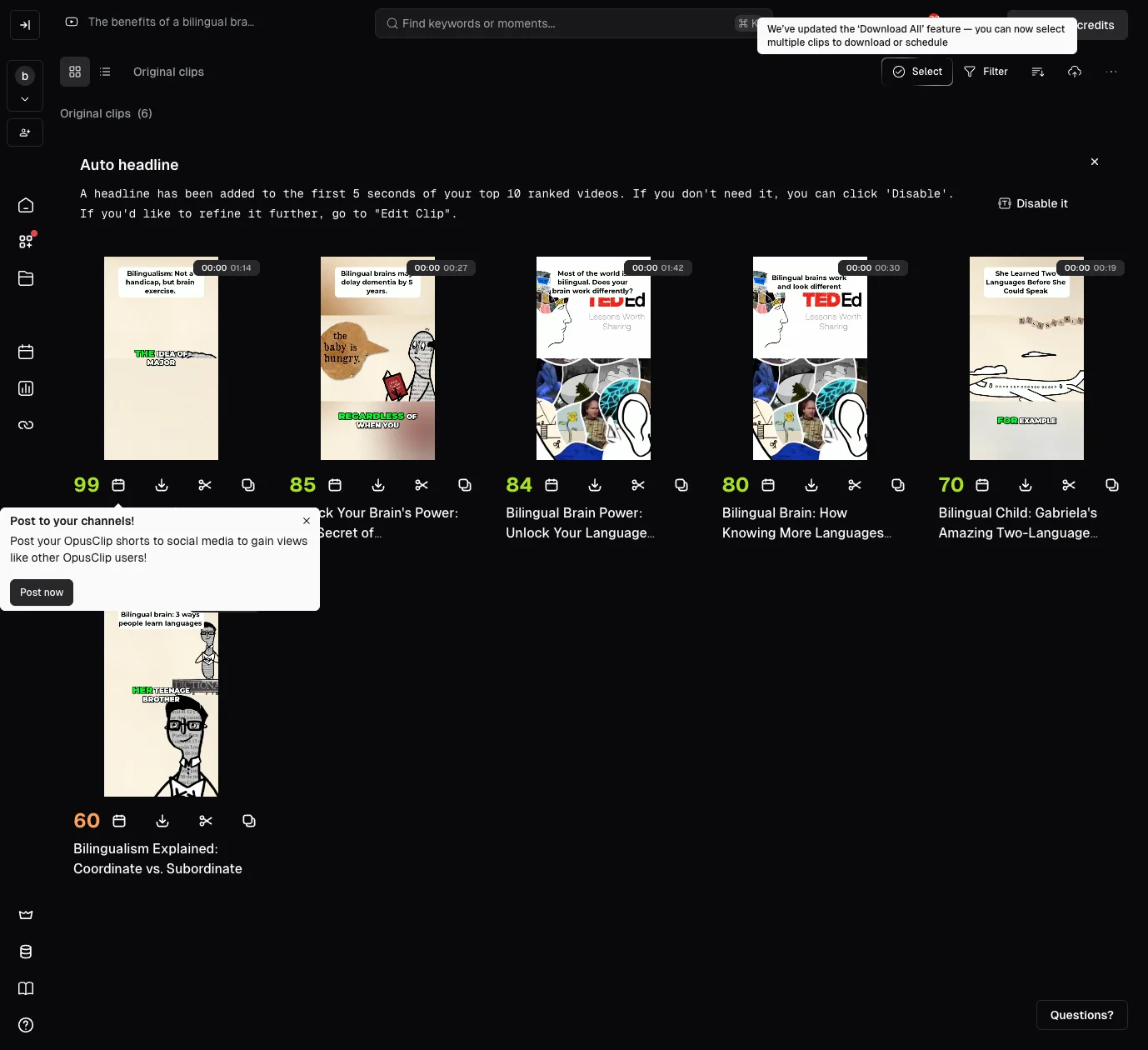
Opus Clip produced 6 clips, with Virality Scores of 99, 85, 84, 80, 70, and 60. Belreos read each clip's full word-level transcript in the editor, rather than only watching the output, to check where each clip actually started and ended.
| Virality Score | Duration | Result |
|---|---|---|
| 99 | 1:14 | Clean open and close, complete sentences on both edges |
| 85 | 0:27 | Opens mid-sentence on a dangling clause with no subject; closes clean |
| 84 | 1:42 | Clean open and close |
| 80 | 0:30 | Clean open and close, but the opening line nearly duplicates the 84-score clip above |
| 70 | 0:19 | Clean open and close, but the AI-generated headline ("She Learned Two Languages Before She Could Speak") is plausible-sounding, not literally accurate to the transcript |
| 60 | 0:19 | Grammatically clean, but opens on a pronoun ("her") introduced only in a different clip, a continuity gap rather than a cut problem |
Methodology note: every clip-accuracy figure in this review, including "5 of 6" and "1 of 6," comes from this single run on this single account. Nothing here is aggregated across multiple tests, video types, or account tiers.
The result: 5 of 6 clips were cut cleanly on both edges, but only 2 of 6 were free of any defect once headline accuracy, duplication, and continuity are also counted. 1 of 6 opened mid-sentence. Of the remaining five, three carried a smaller issue: one clip's opening line nearly duplicated another clip's, one clip opened on an unintroduced pronoun with no antecedent in its own transcript, a continuity gap rather than a factual error, and one clip's AI-generated headline oversold what its own transcript actually said.
Opus Clip Pricing in 2026
Opus Clip's in-app upgrade screen quotes lower prices than its public marketing page: $12 for Starter, $23 for Pro monthly, and $138 for Pro annual, all below the numbers displayed on opus.pro's public pricing page.
| Plan | Public page price | In-app + API price | Credits/month | Credit expiry |
|---|---|---|---|---|
| Free forever | $0 | $0 | 60 | Resets monthly |
| 7-day trial | $0 | $0 | 10 total | 7 days |
| Starter | $15/month | $15 struck through, $12/month | 150 | 60 days |
| Pro, monthly | $29/month | $29 struck through, $23/month | 300 | 60 days |
| Pro, annual | $208.80/year ($17.40/month) | $138/year ($11.50/month) | 300 (3,600 granted upfront) | 12 months |
| Business | Contact sales | Contact sales | Custom | Not stated |
That's a defect that works against OpusClip, not against you: the public page makes the tool look more expensive than its own upgrade screen does. But it still misleads anyone who prices Opus Clip from the public page alone and walks away without checking the in-app numbers. OpusClip's public page shows list prices; its in-app screen shows promo prices with the list struck through. Price the tool from the in-app screen, not the public marketing page.
Belreos did not find the debit timing disclosed on either the public pricing page or the in-app upgrade screen. In testing, Belreos's balance dropped from 10 to 5 credits the instant a job was submitted, while it was still sitting at 0 to 7 percent progress with 5 to 6 minutes left on the clock. Whether a failed job returns its credits was not tested, since the one job submitted completed successfully.
The Free-Tier Watermark: What Belreos Could and Couldn't Confirm
Free-tier watermarking is advertised and long-standing: OpusClip's own marketing pages describe free exports as watermarked, and Wayback Machine snapshots going back more than a year show the same claim. Starter's plan page also lists "Remove Watermark" as a feature you get only by paying, which only makes sense if the tier below it is watermarked. That's the strongest evidence in this review for the free tier specifically, and it comes from OpusClip's own claims, not from a Belreos test.
What Belreos actually tested was different, and it produced a contradiction Belreos cannot resolve. The export panel's preview for the free-trial account used in this review displayed a visible watermark badge. But the file downloaded from that same account, a demo-project export rather than one of the 6 clips generated for the accuracy test above, carried no watermark at all when Belreos checked it frame by frame with ffmpeg: frames pulled at 3 seconds, and at the 30th, 1,200th, and 2,400th frames across the full 87.8-second clip, all four corners, at the file's actual 1080x1920 resolution. No watermark at any of the four checkpoints: no logo, no text, no ghosting. The preview showed a watermark; the downloaded file from the same account did not. Belreos cannot explain that mismatch and is not resolving it here.
That result says something about a Pro-trial export, not about the Free tier. A true Free-tier export was not tested in this review, and given the advertising and Wayback evidence above, the safer assumption is that free exports do carry a watermark. The same file also showed AI captions rendering correctly, including styled text with an emoji ("LOVE" with a green heart), on a bass-guitar music performance rather than talking-head footage. As a demo-project export rather than one of the six tested clips, it shows captions and emoji rendering on non-talking-head footage, but it is not test evidence that ClipAnything performs well across genres, and it doesn't settle the watermark question either way.
Limitations of This Review
Several claims that come up around Opus Clip could not be confirmed firsthand in this pass, and Belreos isn't presenting them as fact:
- Free-tier watermark: Belreos tested a Pro-trial account, not the free-forever plan. Free-tier watermarking is advertised on OpusClip's own marketing pages and has appeared in Wayback Machine snapshots for over a year, but no actual Free-tier export was downloaded and checked in this review.
- Refund on a failed job: untested, since the one job submitted in testing completed successfully and never triggered a refund scenario.
- Post-cancellation lockout: a widely repeated claim describes a lockout period after cancelling a paid subscription. This wasn't testable on a free-trial account, since there was no active paid subscription to cancel. A different, directly observed mechanism exists alongside it: individual clip projects on the trial account carry their own countdown badge reading "6 days before expiring," a project-level expiration, not the cancellation-lockout claim. The two shouldn't be conflated.
- Support: human or bot first: Opus Clip's support widget offers a message form, a help center, a separate "Agent Opus" help center, and a Discord link, but whether a submitted message routes to a human or a bot first wasn't tested.
Third-Party Ratings
Trustpilot and Product Hunt both allow direct data collection, and Belreos checked both on August 19, 2026: Trustpilot rates Opus Clip 4.0 out of 5 across 467 reviews, and Product Hunt rates it 4.51 out of 5 across 78 reviews. Capterra shows 3.6 out of 5 from only 5 reviews, and TrustRadius shows 10 out of 10 (5.0 on a 5-point scale) from only 2 reviews; both samples are too small to draw a conclusion from and are noted here for completeness, not as evidence. G2 was not collected for this review. Weighted by review count, Trustpilot and Product Hunt together put the crowd average at roughly 4.1 out of 5, above Belreos's 3.0 rating. Three findings from this review account for most of that gap: only 2 of 6 test clips came back free of any issue once headline accuracy, duplication, and continuity are counted; the public pricing page understates every paid tier's real in-app price; and the free-tier watermark question ended in an unresolved contradiction rather than a confirmed answer. A star rating on Trustpilot or Product Hunt does not weigh any of those three.
Is Opus Clip Worth It?
Opus Clip's clip-selection engine held up well on cut quality but not on overall polish: 5 of 6 clips were cut cleanly on both edges, though only 2 of 6 came back free of any issue once headline accuracy, duplication, and continuity are also counted. ClipAnything's broader genre support is a real point of difference from clippers built only for talking-head podcasts. The credit economy is arithmetic: you pay for every minute of source video you upload the instant you submit it, not for what you keep. Long-form creators who upload heavily but keep only a small slice as finished clips get the worst of that math and should run the numbers before committing. Separately, price the tool from OpusClip's in-app upgrade screen, not its public marketing page: the public page quotes higher numbers on all three paid tiers than the in-app screen does. If you upload long source video and keep most of it as clips, the credit math works in your favor, since you're paying close to full price for footage you actually use rather than for footage you discard. If you keep only a small slice of a long upload, do that math against your own habits first.
Opus Clip Alternatives
Vizard is the closest structural competitor, also metering by source-video minutes rather than clip count. Its actual pricing could not be confirmed this pass, so there is no dollar comparison here. Klap is a direct competitor in the same clipping category and worth checking as an alternative, though its pricing and metering model were not confirmed this pass. Submagic leans toward captioning short videos you already have rather than generating clips from long-form source, a different job than what Opus Clip does. CapCut is a general-purpose video editor with AI features added on, not a purpose-built clipper, and it offers a free tier. Belreos verifies pricing first-party and hands-on tests tools before publishing those claims. None of these four have been through that process yet. If you want a full manual editor instead of AI-driven clip selection, Descript is worth a look. Vozo AI is another AI video editor in the same category.
Frequently Asked Questions
How does Opus Clip's credit system actually work?
Opus Clip charges 1 credit per minute of the source video you upload, not per finished clip, and the charge posts the moment you submit the job rather than when it completes. A 5-minute source video costs 5 credits whether you keep 1 clip from it or all of them.
Is Opus Clip free to use?
Opus Clip has two free options: a standing free-forever plan with 60 credits a month and no credit card required, and a separate 7-day trial that gives access to Pro-tier features like the Virality Score with 10 credits, also no card required. Beyond either, the cheapest paid plan is Starter, listed at $15/month on the public page and quoted at $12/month on the in-app upgrade screen and pricing API, monthly billing only, with 150 credits that expire after 60 days.
Does Opus Clip watermark free exports?
Almost certainly yes on the free-forever tier, based on OpusClip's own marketing claims, over a year of consistent Wayback Machine snapshots, and Starter's "Remove Watermark" feature line, which only makes sense if the tier below it is watermarked. Belreos's own test complicates the picture rather than confirming it: the export preview for the trial account used in this review showed a watermark badge, but the file actually downloaded from that same account had none, and Belreos cannot explain the mismatch. A true Free-tier export was not independently tested.
How accurate is Opus Clip's AI clip selection?
5 of 6 clips opened and closed on complete sentences in Belreos's hands-on test, but only 2 of 6 came back free of any issue once headline accuracy, duplication, and continuity are also counted. 1 clip opened mid-sentence on a dangling clause. A separate clip opened on an unintroduced pronoun with no antecedent in its own transcript, a continuity gap rather than a factual error, and another clip's AI-generated headline oversold what its transcript actually said.
Is Opus Clip worth the price in 2026?
Opus Clip is worth considering if you regularly produce long-form video and want a fast first pass at short clips, since its core clip-selection engine performed well in testing and the free trial gives real access to Pro-tier features before you pay. It's a harder sell if you upload long source videos but only keep a small fraction as clips, since the credit meter charges for the full source length regardless of what you keep, and you should price the tool from its in-app upgrade screen rather than its public marketing page, which currently quotes higher numbers on all three paid tiers.
- The free trial gives 10 credits over 7 days, full access to Pro-tier features including the Virality Score, and no credit card required. That's a thin credit allowance, about 10 minutes of source video total, but it's real access to features most tools gate behind a paid plan. The separate free-forever plan gives six times as many credits a month, 60 versus the trial's 10, if you'd rather test at your own pace instead of racing a 7-day clock
- In Belreos's one hands-on clip run, 5 of 6 clips opened and closed on complete sentences, verified by reading the full word-level transcript of each clip rather than just watching the output
- ClipAnything, Opus Clip's broader content-detection mode, is built to work on genres beyond talking-head podcasts, a real differentiator most competing clippers don't offer
- The low-credit upsell modal did not repeatedly interrupt the session in testing; it appeared once and never returned, even after the credit balance dropped by half
- Credits are debited the moment you click submit, not when the job finishes. In testing, the balance dropped from 10 to 5 while the job sat at 0 to 7 percent progress, before there was any way to know if the output would be usable
- OpusClip's own in-app upgrade screen and pricing API quote lower prices than its public marketing page on all three paid tiers: Starter shows $15/month on the public page and $12/month in-app, Pro monthly shows $29/month on the public page and $23/month in-app, and Pro annual shows $208.80/year on the public page's Yearly toggle versus $138/year in-app. The gap works against OpusClip, not against you, but it still misleads anyone who prices the tool from the public page alone. Checked 2026-08-17
- Of 6 clips generated in one test run, 1 opened mid-sentence on a dangling subordinate clause with no subject. A second clip's opening line nearly duplicated another clip's, a third opened on an unintroduced pronoun with no antecedent in that clip's own transcript, a continuity gap rather than a factual error, and a fourth clip's AI-generated headline was plausible-sounding but not literally accurate to its own transcript
- The export preview shows a visible "OpusClip" watermark, and removing it requires a paid plan. Free-tier watermarking is advertised on OpusClip's own site and appears in Wayback snapshots going back over a year, but the one export Belreos actually downloaded from the trial account used in this review had no watermark at all, a mismatch between the preview and the downloaded file that Belreos cannot explain. A true Free-tier export was not tested
- Long-form-heavy uploaders who keep only a small slice of what they upload get the worst of the source-minute credit mechanic, and that math was only confirmed here on a 5:04 clip, not tested at podcast-length scale. Refund-on-failure, post-cancellation lockout, and bot-vs-human support also remain unconfirmed firsthand; see Limitations below
Podcasters and long-form creators who want a fast first pass at short clips and are prepared to manage a credit budget tied to upload length rather than output count.
Credits are debited the moment you click submit, not when the job finishes. In testing, the balance dropped from 10 to 5 while the job sat at 0 to 7 percent progress, before there was any way to know if the output would be usable. OpusClip's own in-app upgrade screen and pricing API quote lower prices than its public marketing page on all three paid tiers: Starter shows $15/month on the public page and $12/month in-app, Pro monthly shows $29/month on the public page and $23/month in-app, and Pro annual shows $208.80/year on the public page's Yearly toggle versus $138/year in-app. The gap works against OpusClip, not against you, but it still misleads anyone who prices the tool from the public page alone. Checked 2026-08-17.
Pricing
As of Oct 2026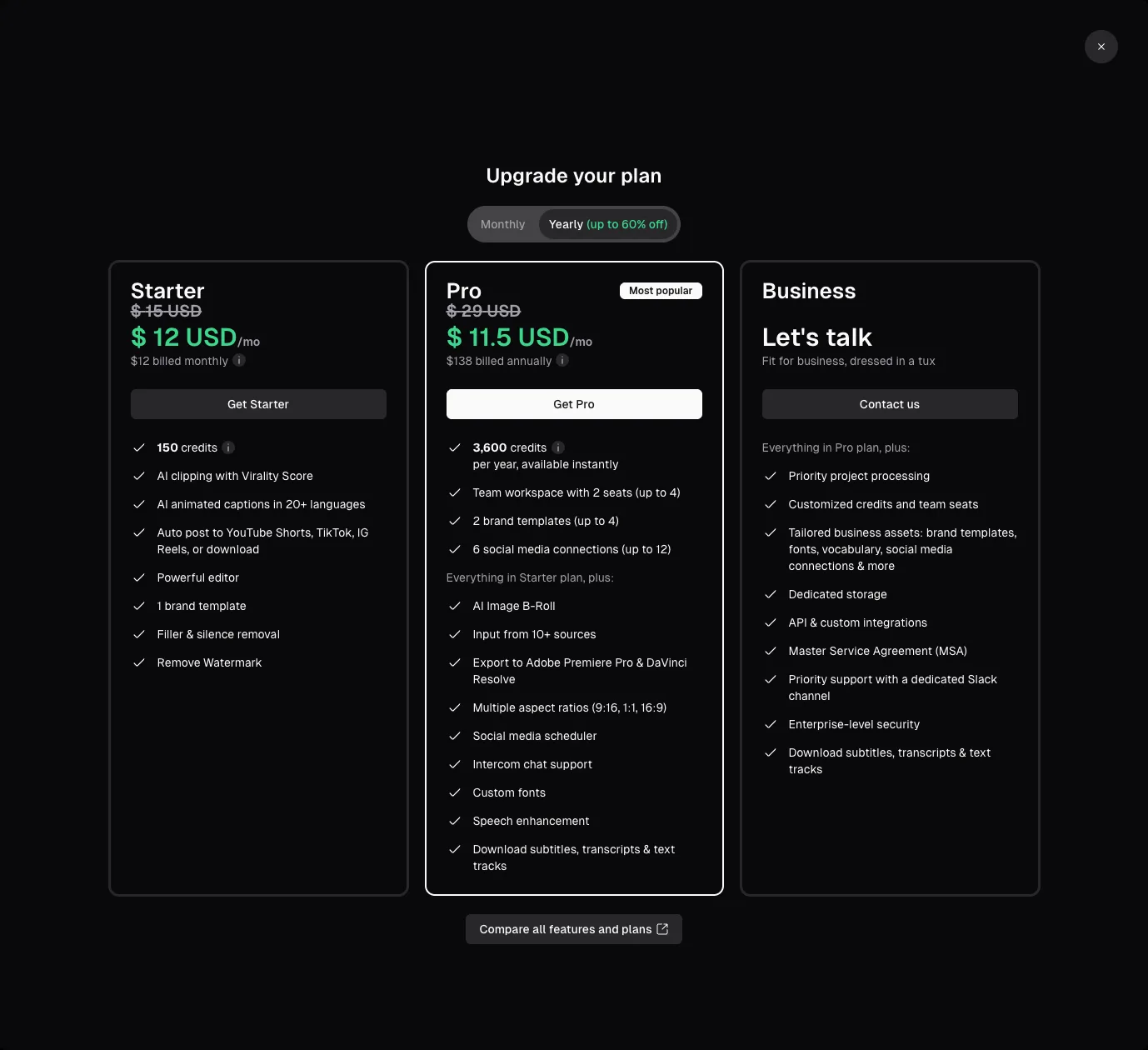
This review was produced independently by the Belreos editorial team. See how we score and test AI tools. Looking for more options? Browse all AI Video Editing Tools tools on Belreos.