
How to Secure a Vibe-Coded App: The 7 Holes AI Coding Tools Leave (and How to Close Them)
A few weeks ago a post titled "I cried today" reached the top of r/vibecoding with over 300 upvotes. The story was short. A solo founder was demoing their new app to a room of people when a customer's financial data appeared on screen: not their own data, someone else's. The app had been pulling every user's records into every session. It had worked in testing. It had worked in the demo. It had just never been checked.
If you have shipped something with an AI coding tool and that story made your stomach drop, read this to the end. You are not careless, and your app is probably not beyond saving. The uncomfortable truth is also the reassuring one: the code is not the problem. The lack of a security review is. The holes AI tools leave are predictable, they repeat from app to app, and every one of them has a check you can run in a couple of minutes and a fix you can apply today.
This is that checklist. Seven holes, in the order they tend to hurt. For each one: what it is, how to check whether you have it, how to close it, and which kind of scanner catches it automatically so you never have to remember again.
First, why this keeps happening (and why it is not your fault)
AI coding tools optimize for code that runs, not code that is safe. They write the happy path beautifully and skip the boring, defensive parts a security-minded engineer adds by habit. The result is measurable, and the numbers are worth stating plainly so you know you are not an outlier:
| Finding | Source |
|---|---|
| 45% of AI-generated code introduces an OWASP Top 10 vulnerability | Veracode 2025 GenAI Code Security Report |
| 5,600 vibe-coded apps scanned turned up 2,000+ vulnerabilities, 400+ exposed secrets, and 175 PII leaks | Escape.tech |
| 91.5% of vibe-coded apps contain at least one vulnerability | Q1 2026 research (SoftwareSeni summary) |
| One founder who "wrote zero lines of code" had their production database exposed within five days: roughly 1.5M API tokens and 35,000 emails | Wiz research (the Moltbook breach), January 2026 |
The tools that make building this fast, Cursor and GitHub Copilot, are extraordinary at turning an idea into a working app. They are not trying to attack your app, so they do not think like someone who is. That gap is exactly what a review step closes. Let us close it.
Hole 1: Your database is readable by anyone (Supabase and Firebase RLS left off)
What it is. Supabase and Firebase hand your frontend a public API key on purpose: it is meant to be in the browser. What keeps that key from reading your whole database is Row Level Security (RLS) policies. When RLS is off, every table is world-readable and often world-writable to anyone holding the key that ships in your app. This is the single most common concrete failure people report, and it is almost certainly what leaked the finance data in the story above. CVE-2025-48757, disclosed in 2025, documented exactly this failure at scale: 303 exposed endpoints across 170 production Supabase apps that had shipped with RLS left off.
How to check. In the Supabase SQL editor, list every table that has RLS disabled:
select tablename, rowsecurity
from pg_tables
where schemaname = 'public' and rowsecurity = false;
Any row that comes back is an open table. You can also confirm from the outside, the way an attacker would, by calling the REST endpoint with your public anon key and no logged-in user:
curl "https://YOUR_PROJECT.supabase.co/rest/v1/your_table?select=*" \
  -H "apikey: YOUR_ANON_KEY"
If that returns rows, the table is exposed. (Yes, "is my Supabase database exposed" has a two-minute answer, and this is it.)
How to close it. Turn RLS on for every table and write a policy that limits rows to their owner:
alter table your_table enable row level security;

create policy "users read own rows"
  on your_table for select
  using (auth.uid() = user_id);
Repeat for insert, update, and delete. Default to denying everything, then open only what a given user should see.
What automates it. This is a configuration problem, not a code problem, so a code scanner will not catch it. Cloud posture (CSPM) checks will, and Supabase ships its own security advisor that flags tables with RLS off. Run the advisor after every schema change.
Hole 2: Secrets are committed to your repository
What it is. An API key, a database URL, or a service token pasted directly into a source file and committed. Deleting it later does not help: Git keeps it in history forever, and public repos are scraped for exactly this within minutes.
How to check. Scan your entire history, not just the current files, with a dedicated tool. Gitleaks runs in one command with no install:
docker run --rm -v "$(pwd):/repo" zricethezav/gitleaks:latest \
  detect --source=/repo -v
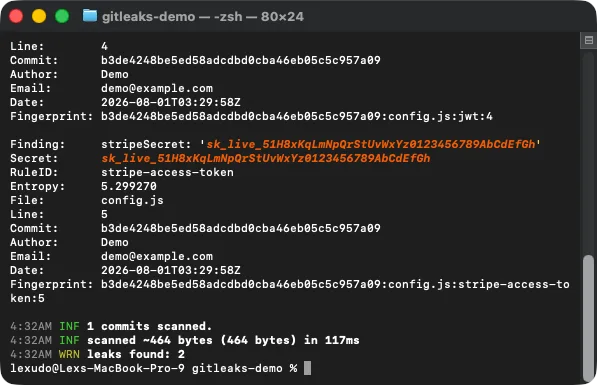
Real output from running the command above against a demo repo: two leaks found, a Stripe secret key and a JWT.
For a quick manual pass, grep the working tree for common key shapes:
git grep -nE '(sk-[a-z0-9]|api[_-]?key|secret|password|BEGIN RSA)'
How to close it. Treat any committed key as already compromised and rotate it first, before anything else. Then move secrets into environment variables, add your .env to .gitignore, and load them at runtime. Scrubbing Git history is possible but slow; rotating the key makes the leaked copy worthless, which is what actually matters.
What automates it. Secret scanning. GitHub secret scanning is free on public repositories, and Gitleaks, Snyk, and all-in-one tools like Aikido run it in your CI so a secret never reaches main again.
Hole 3: Secrets are shipped inside your client bundle
What it is. This is the subtler cousin of Hole 2, and it catches people who did everything right with their .env file. Build tools inline any variable prefixed VITE_, NEXT_PUBLIC_, or REACT_APP_ directly into the JavaScript sent to the browser. Put a real server secret behind one of those prefixes and it is public, even though it never appears in your source and never gets committed.
How to check. Build the app, then grep the compiled output for anything that should never be there, like a Supabase service_role key or a secret key prefix:
npm run build
grep -rEli 'service_role|sk-[a-z0-9]|secret' dist/ .next/ build/ 2>/dev/null
Or open the deployed app, press F12, go to the Sources tab, and search the bundle for your key's prefix. If it is in there, every visitor has it.
How to close it. Anything sensitive stays server-side, in an API route or an edge function. The browser should only ever hold the publishable or anon key that is designed to be public. Find any misprefixed variable, rename it so it is no longer exposed to the client, move the call that uses it to the server, and rotate the key that leaked.
What automates it. Secret scanners catch some of these, but the reliable check is the build-and-grep above, run in CI against your compiled bundle. Make it a step that fails the build.
Hole 4: Any input goes straight into your queries (injection)
What it is. An open text field wired directly into a database query, a shell command, or an LLM prompt. AI writes the version that works when users are polite; it rarely writes the version that survives a user who is not. Injection is the largest single class of confirmed AI-code vulnerabilities, roughly a third of them, and it is what lets someone turn a search box into a way to read your whole table.
How to check. Find every endpoint that takes user input and reaches a database, then send it a classic probe:
curl -X POST https://yourapp.com/api/search \
  -H 'Content-Type: application/json' \
  -d '{"q": "'"'"' OR 1=1--"}'
If you get back rows you should not see, a database error leaks, or the whole table comes out, that endpoint is building queries by gluing strings together.
How to close it. Validate every input at the boundary with a schema library (Zod, Pydantic) and reject anything that does not match. Never concatenate user input into a query: use parameterized queries or your ORM's query builder, which keep data and code separate. The same applies to prompts and shell commands.
What automates it. Static analysis (SAST). Tools like Semgrep, Snyk Code, and CodeQL are genuinely good at spotting the string-concatenation pattern behind injection and will flag it on every commit.
Hole 5: There is no rate limiting
What it is. No cap on how many requests one person can make. It feels harmless until someone points a script at your login form (credential stuffing), scrapes your entire catalog, or hammers the one endpoint that calls a paid API and hands you the bill. AI tools almost never add rate limiting on their own because nothing breaks without it, until it does.
How to check. Fire a burst of requests at a sensitive endpoint and watch the status codes:
for i in $(seq 1 100); do
  curl -s -o /dev/null -w "%{http_code}\n" https://yourapp.com/api/login
done | sort | uniq -c
If you see a hundred 200s and not a single 429, there is no limit in place.
How to close it. Add a limiter as far out as you can: your host or CDN (Cloudflare, Vercel) can do per-IP limits with no code, or add per-IP and per-user limits in middleware. Protect login, signup, password reset, and any endpoint that calls a paid API first.
What automates it. Be honest with yourself here: no scanner reliably detects the absence of rate limiting, because there is no bad code to find, only missing good code. This one is a design review item. Put "does this endpoint need a limit?" on a checklist and answer it for every route.
Hole 6: Anyone logged in can read anyone's data (broken authorization)
What it is. AI reliably checks that you are logged in. It routinely forgets to check that the thing you are asking for is yours. So /api/orders/123 confirms you have an account, then cheerfully returns order 123 no matter whose it is. Change the number, read the next person's data. This is called broken object-level authorization (IDOR), and it is the single hardest hole to catch automatically because the code looks completely correct.
How to check. Log in as user A, note a resource ID that belongs to them, then request that same ID as user B (or with a different token):
curl https://yourapp.com/api/orders/123 \
  -H "Authorization: Bearer USER_B_TOKEN"
If user B gets user A's order back, you have it. Try it on every endpoint that takes an ID.
How to close it. Every endpoint must check ownership on the server, not just authentication. The query itself should be scoped, for example where id = $1 and user_id = auth.uid(), so it is structurally impossible to return someone else's row. Default to deny, and never trust an ID from the client to already be safe.
What automates it. Partially, SAST helps, but authorization logic is about intent, and intent is hard for a pattern matcher. This is the hole where a human or agentic review earns its keep: the best AI code review tools of 2026 are built to reason about whether an endpoint actually enforces ownership, which a scanner cannot. Pair a scanner with a review step here.
Hole 7: Your paid API keys are visible in the browser's network tab
What it is. Calling a paid service (OpenAI, Stripe, a mapping API) directly from the frontend means the key travels with the request, in plain sight in the Network tab. Anyone can open developer tools, copy it, and spend your money or your rate limit. This is the "free-tier drained overnight" story people keep posting.
How to check. Open the deployed app, press F12, go to the Network tab, and trigger the feature. Click the request and read its headers. If you see your key in an Authorization or api-key header, it is public to every visitor.
How to close it. Proxy every paid API through your own server. The browser calls your endpoint, your server holds the key and forwards the request. The key never leaves your backend. Then rotate whatever key was already exposed, because it should be considered burned.
What automates it. The same secret scanning and build-bundle grep from Holes 2 and 3 catch keys embedded in client code, and traffic inspection (DAST) catches keys leaving in requests. The manual Network-tab check takes thirty seconds and is worth doing regardless.
The two-minute triage
If you only do one pass today, run down this table. It is the whole checklist in one place.
| Hole | Fastest check | What catches it automatically |
|---|---|---|
| 1. Database readable by anyone | Query pg_tables for RLS off; curl the REST endpoint | Cloud posture / Supabase advisor |
| 2. Secrets committed to the repo | Run Gitleaks over full history | Secret scanning (GitHub, Snyk, Aikido) |
| 3. Secrets in the client bundle | Build, then grep dist/ for secret prefixes | Secret scanning in CI on the build output |
| 4. Injection from unvalidated input | Send an OR 1=1-- probe to input endpoints | SAST (Semgrep, Snyk Code, CodeQL) |
| 5. No rate limiting | Fire 100 requests, look for 429 | Design review (no scanner catches absence) |
| 6. Broken authorization / IDOR | Request another user's ID with your token | SAST plus human or AI code review |
| 7. Paid keys in the browser | Network tab, read request headers | Secret scanning + traffic inspection |
The one habit that closes all seven
Every hole above comes from the same missing step: nobody looked at the code through an attacker's eyes before it shipped. You do not need to become a security engineer to add that step. You need to run the checks in this article once, fix what they surface, and then let a scanner run them for you on every change so the holes cannot quietly come back.
That is the whole move. The manual checks here tell you where you stand right now. A scanner in your CI keeps you there. If you are ready to automate this instead of remembering it, our guide to the best AI code security scanners of 2026 compares the tools that run all of these checks continuously, most with a free tier that covers a solo project.
Run one free scan before you tell anyone your app is done. It is the difference between the founder who found the hole and the founder who cried in front of a room.
The code was never the problem. Now the review step is not missing either.